


Close Menu

    Subscribe to Updates

    Get the latest tech news

    Facebook X (Twitter) Instagram
    TechArenaTechArena
    • Home
    • News
    • Reviews
    • Features
      • Top 5
    • Startups
    • Contact
    Facebook X (Twitter) Instagram
    TechArenaTechArena
    Home»Apps»Microsoft Adds Support for iCloud Accounts in new Outlook for Mac
    Apps

    Microsoft Adds Support for iCloud Accounts in new Outlook for Mac

    Alvin WanjalaBy Alvin WanjalaDecember 16, 20202 Mins Read
    Facebook Twitter Telegram LinkedIn WhatsApp Email Pinterest
    outlook on mac os big sur
    outlook on mac os big sur
    Share
    Facebook Twitter LinkedIn WhatsApp Telegram

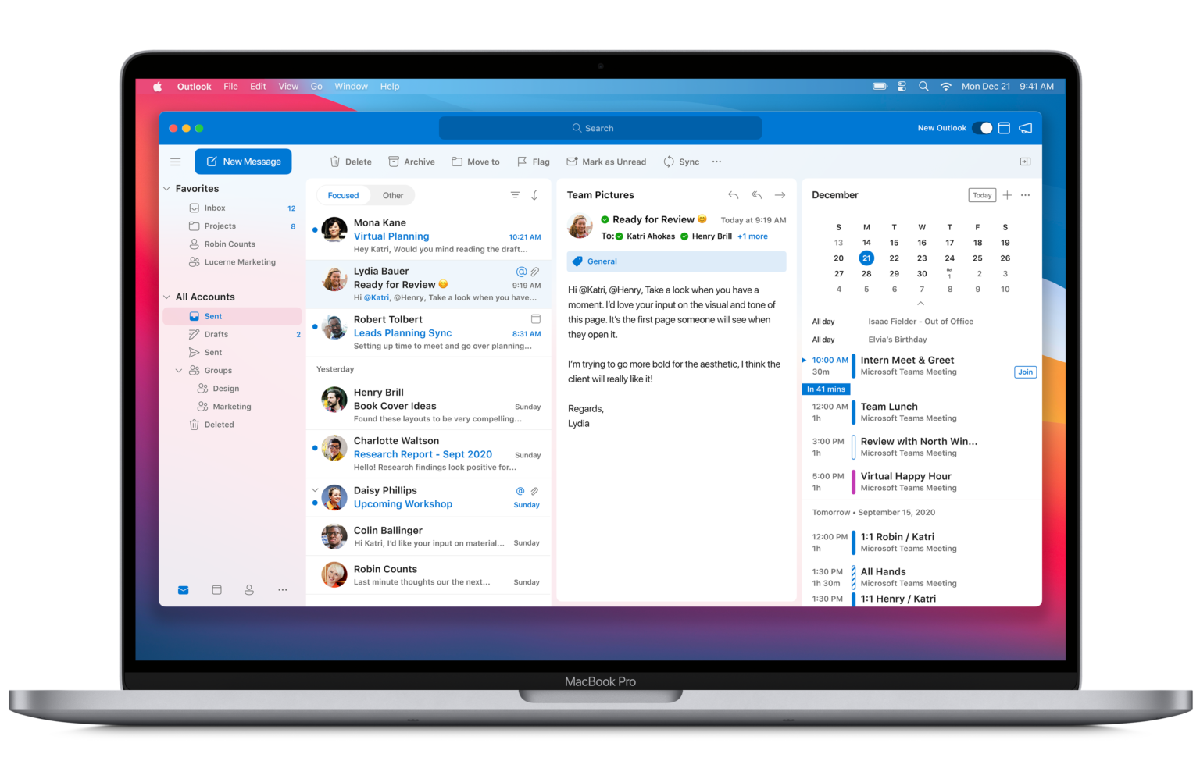
    Yesterday Microsoft announced that it is adding support for iCloud accounts in the new Outlook for Mac. The new Outlook will be landing in the coming weeks enabling Mac users to organize work and personal emails, contacts, and calendars together in a single app.

    The redesigned Outlook embodies Microsoft’s Fluent UI design system, its primary aesthetic design language across its services and apps. Microsoft says it also says the redesigned Outlook matches macOS Big Sur’s new look and has been built with simplicity and ease of use in mind.

    The same applies to other Office apps for Mac, including Word, Excel, PowerPoint, and OneNote for Mac.

    Universal app support for M1 Macs

    Apple’s shift to in-house ARM-based processors was groundbreaking, bringing a breath of new life to its Macs. The challenge was app compatibility, which the company tries to solve with a new feature called Universal apps.

    Universal apps are built to run on Macs with Apple Silicon and Intel processors. Adobe was the first to jump ship with Lightroom, and now Microsoft is following suit with Universal app support for Macs with M1.

    “We are excited to announce that starting today we are releasing new versions of many of our Microsoft 365 for Mac apps that run natively on Macs with M1.”

    Universal app support for Microsoft’s flagship office apps like Outlook, Word, Excel, PowerPoint, and OneNote will improve performance as they will be able to take full advantage of the speed leaps on the new M1-powered MacBook Air, 13-inch MacBook Pro, and Mac mini. At the same time, the apps will also run natively on Intel-powered Macs.

    Microsoft Teams will also be available as a universal app in the future.

    Read Next: Microsoft Office Adds Trackpad and Mouse Support on the iPad

    Microsoft microsoft office outlook
    Alvin Wanjala
    • Facebook
    • X (Twitter)
    • Instagram

    Alvin Wanjala has been writing about technology for over 2 years(and counting). He writes about different topics in the consumer tech space. He loves streaming music, programming, and gaming during downtimes.

    Related Posts

    NTT DATA Named a Top Employer in Kenya for 2026

    January 16, 2026

    Binance Research 2025: How Regulation, Stablecoins, and DeFi Turned Crypto into a Real Financial System

    January 16, 2026

    Back-to-School is Now Stress-Free with Prepaid Card for Students

    January 16, 2026

    Comments are closed.

    Latest Posts

    NTT DATA Named a Top Employer in Kenya for 2026

    January 16, 2026

    Binance Research 2025: How Regulation, Stablecoins, and DeFi Turned Crypto into a Real Financial System

    January 16, 2026

    Back-to-School is Now Stress-Free with Prepaid Card for Students

    January 16, 2026

    Hashgraph Ventures Pledges $1 Million to Power Africa’s Largest Web3 Hackathon

    January 16, 2026
    Advertisement
    Editor's Pick

    Binance Research 2025: How Regulation, Stablecoins, and DeFi Turned Crypto into a Real Financial System

    January 16, 2026

    Human Behaviour, Not AI, Will Determine Who Wins in 2026

    January 14, 2026

    Looking Ahead in 2026 and the Forces that Will Shape Africa’s Digital Future

    January 12, 2026

    How to Check the 2025 KCSE Examination Results Online

    January 9, 2026
    © 2026 TechArena.. All rights reserved.
    • Home
    • Startups
    • Reviews

    Type above and press Enter to search. Press Esc to cancel.