Close Menu

    Subscribe to Updates

    Get the latest tech news

    Facebook X (Twitter) Instagram
    TechArenaTechArena
    • Home
    • News
    • Reviews
    • Features
      • Top 5
    • Startups
    • Contact
    Facebook X (Twitter) Instagram
    TechArenaTechArena
    Home»Apps»APP OF THE WEEK: Quick PDF Scanner – Scan Documents Using Your Phone
    Apps

    APP OF THE WEEK: Quick PDF Scanner – Scan Documents Using Your Phone

    Saruni MainaBy Saruni MainaMay 30, 2016Updated:May 30, 20162 Mins Read
    Facebook Twitter Telegram LinkedIn WhatsApp Email Pinterest
    quick pdf scanner ico
    quick pdf scanner ico
    Share
    Facebook Twitter LinkedIn WhatsApp Telegram

    Ever been in that situation where you really have to send someone a document but you do not have access to a scanning machine? Well, this week’s app offers a solution to such a rare but very possible situation.

    Quick PDF Scanner is one of those apps that weeks pass by before you open it, you might even end up forgetting that you have it installed but when the need arises, you’ll be glad you had it.

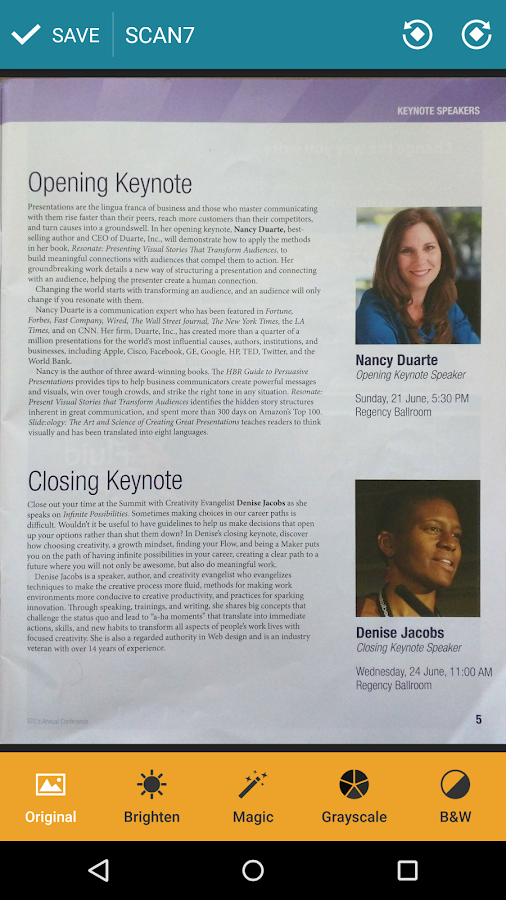
    Quick PDF Scanner lets you scan documents using your smartphone, and save them in a format (pdf) that is easy to send through email. The first time I got the need for this app, I was required to scan my school ID and send it to Microsoft so as to get a free student account for Xamarin, and the app did not disappoint. The quality of the scanned document is so good that one might think you actually used a real scanner. Quick PDF Scanner made it to this list, despite of hundreds other apps available with an almost similar functionality, due to:

    • Its neat user interface that is easy to use
    • Real-time tracking of the document frame providing an accurate edge detection
    • Its advanced camera configuration and full customization of the resulting PDF file, meaning you can edit your scanned document
    • Has optical character recognition that converts photo to text
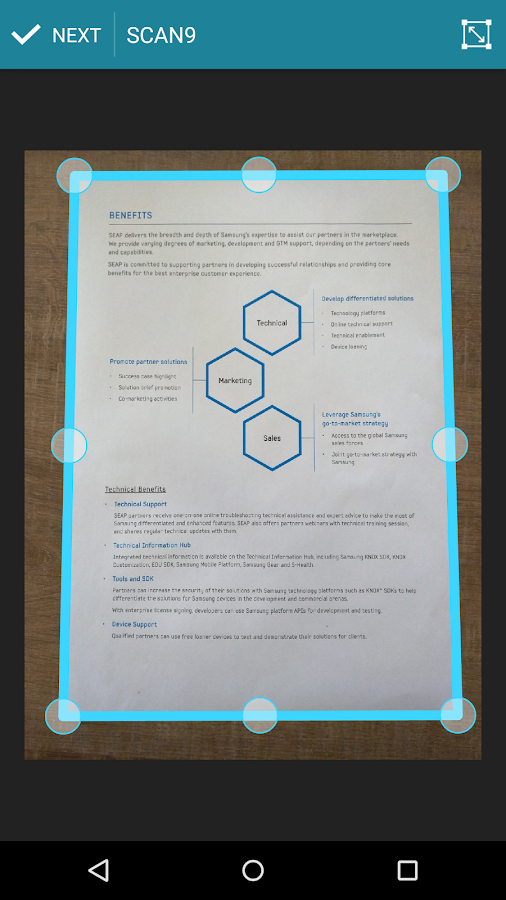
    The guys over at Quick PDF Scanner have also provided a video that showcases exactly how the app works. Check it out:

    [youtube url=”https://www.youtube.com/watch?v=snW-xG2Y7mI” width=”560″ height=”315″]

    As I mentioned earlier, this is one of those apps that you could end up forgetting you had installed, but can prove to be very useful when actually used. I would recommend this app to anyone, but mostly to students. Forget taking a picture of the notes for that lecture session you missed, just use Quick PDF Scanner and you will get a more readable and even editable version of the notes.

    Download Quick PDF Scanner on Play store

    Last Week’s App: BBD – Compare Product Prices on Your Phone

    App of the week
    Saruni Maina
    • Website
    • Facebook
    • X (Twitter)

    I'm all about mobile apps, gadgets and smartphones. I tell you what's worth getting and what sucks!

    Related Posts

    MYDAWA Stabilizes Platform After Major Upgrade

    December 18, 2025

    How to Bridge your Imagination and Reality This Festive Season with Galaxy AI

    December 16, 2025

    Airtel Money Enables Direct Showmax Payments for Kenyan Subscribers

    December 16, 2025

    Comments are closed.

    Latest Posts

    LG OLED TVs: Cinematic true-to-life viewing experiences for live AFCON matches

    January 27, 2026

    How to Choose the Right Data Centre in East Africa: A Practical Guide for Enterprises and Startups

    January 27, 2026

    OPPO Launches Reno15 Series in Kenya With 200MP Camera

    January 26, 2026

    The Rise of Online Betting in Kenya: Why Players Are Choosing – Secretbet

    January 26, 2026
    Advertisement
    Editor's Pick

    How to Choose the Right Data Centre in East Africa: A Practical Guide for Enterprises and Startups

    January 27, 2026

    How 2026 will stitch together the future of payments

    January 22, 2026

    5 Blockchain Trends to Watch in 2026: Insights from D24 Fintech’s CTO

    January 21, 2026

    Why SMEs Need Tailored Digital Banking Solutions

    January 20, 2026
    © 2026 TechArena.. All rights reserved.
    • Home
    • Startups
    • Reviews

    Type above and press Enter to search. Press Esc to cancel.