


Close Menu

    Subscribe to Updates

    Get the latest tech news

    Facebook X (Twitter) Instagram
    TechArenaTechArena
    • Home
    • News
    • Reviews
    • Features
      • Top 5
    • Startups
    • Contact
    Facebook X (Twitter) Instagram
    TechArenaTechArena
    Home»Features»Google Pixel 4 to get ‘Pro Session’ and Social Share, an easier way to share images
    Features

    Google Pixel 4 to get ‘Pro Session’ and Social Share, an easier way to share images

    John NyabutoBy John NyabutoOctober 4, 20192 Mins Read
    Facebook Twitter Telegram LinkedIn WhatsApp Email Pinterest
    E3B1C293 BAD9 4042 A4CB 527550CCAF82.0
    E3B1C293 BAD9 4042 A4CB 527550CCAF82.0
    Share
    Facebook Twitter LinkedIn WhatsApp Telegram

    I bet there is no phone which has been leaked a lot like the Google Pixel 4. We’ve seen very many leaks this week in addition to a variety of leaks in previous weeks, and we’ve got even more leaks dropping today.

    While there wasn’t a lot of new information to learn since the 2019 Pixels have leaked so much already, those marketing images did provide us with our highest quality look at the Google Pixel 4 features so far. Here are new details from the updated version of the “Pixel Tips” app. The Tips app debuted on Pixel 3 as a way to introduce new Pixel owners to Google’s software features. The two new details in the updated version of the app we’re sharing involve the Google One and Google Camera apps, but the rest of the demos in the Tips app also reveals basically all of the highlights of the new Pixel 4 devices.

    One can be able to schedule a ‘Pro Session’ through the Google One app if you’re new to the Pixel and are looking for help getting started with the device. Pro Sessions are only offered in English in the U.S. and Canada, though. That’s disappointing, but ultimately not surprising since a lot of Pixel-exclusive features are limited to North America anyway.

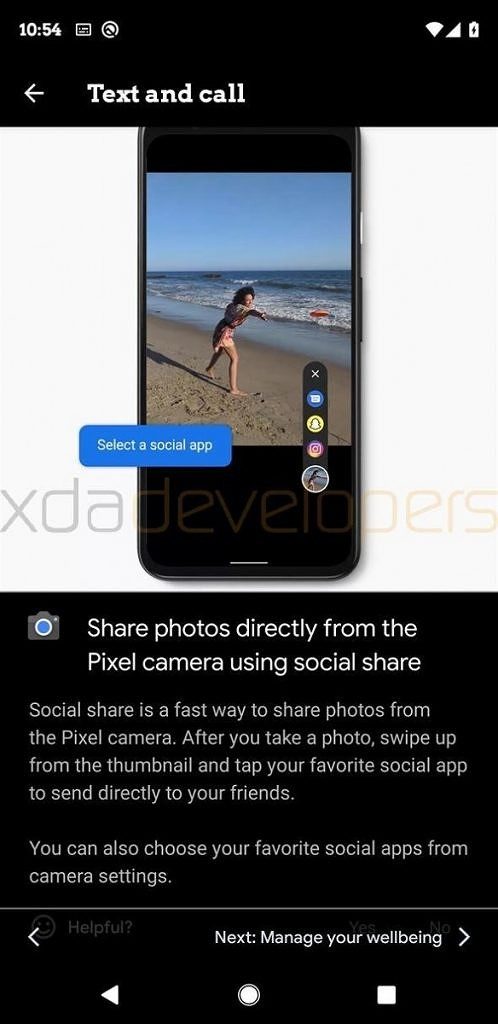
    Google Camera app is adding a new shortcut to quickly share photos straight from the camera app. Called “social share,” this feature works by swiping up on the thumbnail of your recently captured photo and selecting your favourite social media app from the list that appears on top.
    Other Google Pixel 4 features we can see in the Pixel Tips app include the new Live Caption feature in Android 10, car crash detection, Google Podcasts pre-installation, and the new Google Recorder app with built-in transcription and audio search. The “built-in Podcasts” just refers to the already-available Google Podcasts app on the Play Store, which is just a shortcut to the Podcasts service in the Google App.

    Also Read: Live Captions Coming first to the yet to be Launched Google Pixel 4

    Google Pixel 4 Social Share
    John Nyabuto

    Related Posts

    Bolt Safety Index: 94% of Kenyan Ride-Hailing Users See Apps as Safer Than Traditional Transport

    November 11, 2025

    TCL Launches Next-Gen QD-Mini LED TVs in Kenya

    November 10, 2025

    Safaricom’s HY26: Cloud, IoT and Fiber Emerge as the Next Big Growth Engines

    November 7, 2025

    Comments are closed.

    Latest Posts

    Havells India Sues Jiji Kenya Over Sale of Alleged Counterfeit Electrical Goods

    November 12, 2025

    Binance Expands Localized Crypto Access Across Africa

    November 12, 2025

    Zuri Health Expands into AI-Powered Women’s Healthcare with “Petals” on WhatsApp

    November 12, 2025

    Atlancis Launches Africa’s First GPU-Powered AI Factory in Kenya Hosted at iXAfrica Data Centres

    November 11, 2025
    Advertisement
    Editor's Pick

    Safaricom’s HY26: Cloud, IoT and Fiber Emerge as the Next Big Growth Engines

    November 7, 2025

    Inside Jumia’s Black Friday 2025 – How the E-commerce Giant is Powering Kenya’s Biggest Shopping Event

    November 6, 2025

    Corporate Stablecoins: Transforming African Business this Crypto Month

    October 30, 2025

    Crash Bet: How the Fastest Casino Game Took Over Kenya

    October 29, 2025
    © 2025 TechArena.. All rights reserved.
    • Home
    • Startups
    • Reviews

    Type above and press Enter to search. Press Esc to cancel.