


Close Menu

    Subscribe to Updates

    Get the latest tech news

    Facebook X (Twitter) Instagram
    TechArenaTechArena
    • Home
    • News
    • Reviews
    • Features
      • Top 5
    • Startups
    • Contact
    Facebook X (Twitter) Instagram
    TechArenaTechArena
    Home»Apps»Xiaomi’s Poco Launcher 2.0 is Out
    Apps

    Xiaomi’s Poco Launcher 2.0 is Out

    Kaluka wanjalaBy Kaluka wanjalaJune 14, 20192 Mins Read
    Facebook Twitter Telegram LinkedIn WhatsApp Email Pinterest
    Poc launcher
    Poc launcher
    Share
    Facebook Twitter LinkedIn WhatsApp Telegram

    If you are a fan of third-party launchers for Android, you probably have heard of the Xiaomi Poco Launcher. This custom UI was first released with the unveiling of the Pocophone F1 and was exclusively available for that phone. It did not take long before the launcher was available on the Google Play Store for all Android users to download.

    Poco launcher has been downloaded over 5 million times from the Play Store so far and now version 2.0 is out with some design changes. Xiaomi is inviting beta testers who want to try out Poco launcher version 2.0 before it is rolled out to the public.

    We need you!

    Do you want to experience POCO Launcher 2.0? Come and join us to be a user of POCO beta. A totally new launcher journey is waiting for you.

    Download POCO Launcher 2.0 at https://t.co/hSpAZSnSNp pic.twitter.com/2Kjv9JUMjo

    — Xiaomi HyperOS (@XiaomiHyperOS_) June 14, 2019

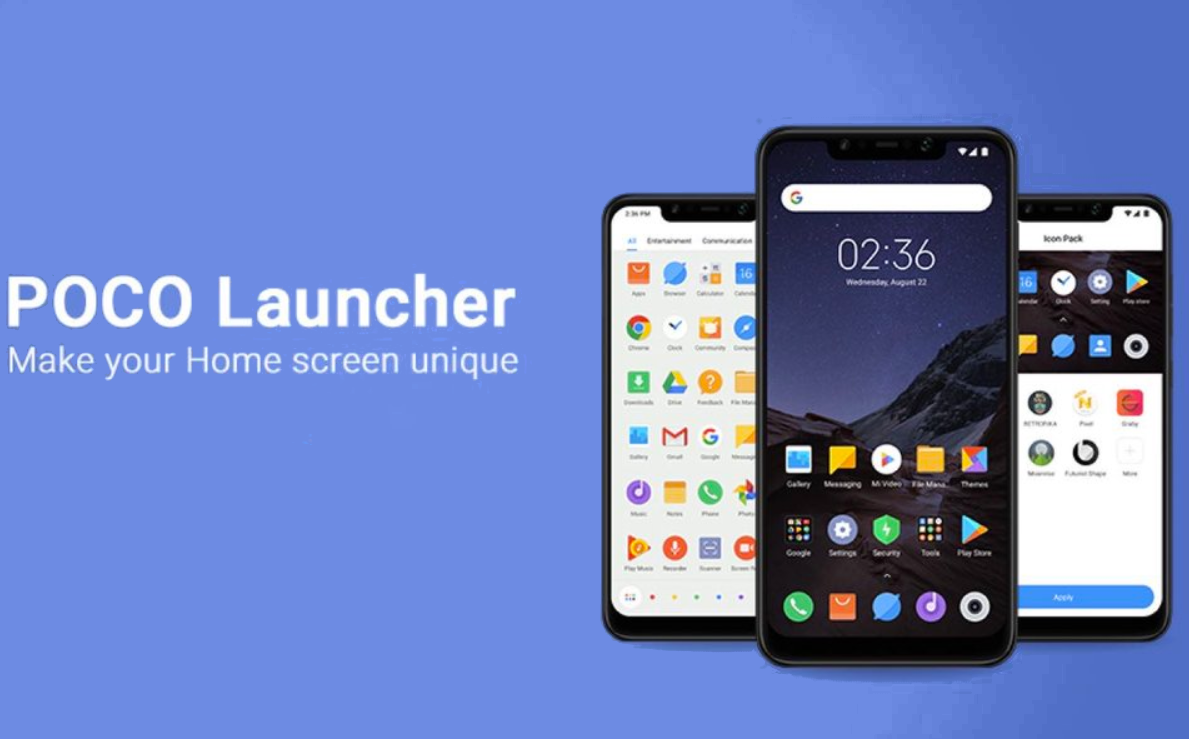
    The design has received most of the changes with overall experience being a key area of focus too. The app drawer now can have a semi-transparent background and this will let users see their wallpapers even under the white/black/grey layer. You can play around with this feature and customize it to exactly what you want.

    Poco Launcher is a highly customizable Custom UI and this is one of the reasons people love it. It is appealing to Android enthusiasts but can be confusing to newbies who may say it is very complicated. With Poco launcher, you can add different groups like Entertainment and Social. These will still be there with Poco Launcher 2.0 but the good thing is you can delete some of them and you can also create your own sections if you wish to do so.

    You can go ahead and sign up for the beta version of Poco 2.0 and let me know how that goes, If you do not want to be a beta tester, you can also download the first version from the Google Play Store here.

    Now Read: Five things I Love About the Xiaomi Redmi Go

    Poco Launcher xiaomi
    Kaluka wanjala
    • Website
    • Facebook
    • X (Twitter)
    • LinkedIn

    Editor at TechArena. I cover all things technology and review new gadgets as I get them. You can reach me on email: [email protected]

    Related Posts

    MYDAWA Stabilizes Platform After Major Upgrade

    December 18, 2025

    How to Bridge your Imagination and Reality This Festive Season with Galaxy AI

    December 16, 2025

    Airtel Money Enables Direct Showmax Payments for Kenyan Subscribers

    December 16, 2025

    Comments are closed.

    Latest Posts

    NETSCOUT Boosts Observability for Remote Sites With Wi-Fi 7 and Real-Time SSL Certificate Monitoring

    January 29, 2026

    Abci-Nexus Spins Out Asopo Technologies to Take Bboxx’s Pulse Software Global

    January 29, 2026

    Why Kenyan Companies Are Rethinking Cloud Strategy: Cost, Compliance and the Rise of Local Providers

    January 29, 2026

    LG to Unveil Integrated HVAC Component Solutions for Next-Gen Commercial Rooftop Systems at AHR Expo 2026

    January 29, 2026
    Advertisement
    Editor's Pick

    Why Kenyan Companies Are Rethinking Cloud Strategy: Cost, Compliance and the Rise of Local Providers

    January 29, 2026

    Why Data Privacy Week matters for you and how to protect your information online

    January 28, 2026

    Automate your monthly bills to keep your budgets on track

    January 28, 2026

    How to Choose the Right Data Centre in East Africa: A Practical Guide for Enterprises and Startups

    January 27, 2026
    © 2026 TechArena.. All rights reserved.
    • Home
    • Startups
    • Reviews

    Type above and press Enter to search. Press Esc to cancel.