


Close Menu

    Subscribe to Updates

    Get the latest tech news

    Facebook X (Twitter) Instagram
    TechArenaTechArena
    • Home
    • News
    • Reviews
    • Features
      • Top 5
    • Startups
    • Contact
    Facebook X (Twitter) Instagram
    TechArenaTechArena
    Home»Apps»You Can Now Delete WhatsApp Messages That You Have Sent
    Apps

    You Can Now Delete WhatsApp Messages That You Have Sent

    Kaluka wanjalaBy Kaluka wanjalaOctober 30, 20172 Mins Read
    Facebook Twitter Telegram LinkedIn WhatsApp Email Pinterest
    WhatsApp for Android
    WhatsApp for Android
    Share
    Facebook Twitter LinkedIn WhatsApp Telegram

    If you have ever wanted to delete WhatsApp messages that you have sent, you should be happy to know that it is now possible to do so. This is one of the most requested features and started rolling out to users last week to select users. You can delete a message if you have sent it to the wrong person or if it has a mistake.

    To delete a message you have sent, just tap and hold the message and choose the delete option at the top. You can do this for both individual and group chats. When you choose the delete option, you will be presented with three options, “Delete for Me”, “Cancel” and “Delete for everyone”.
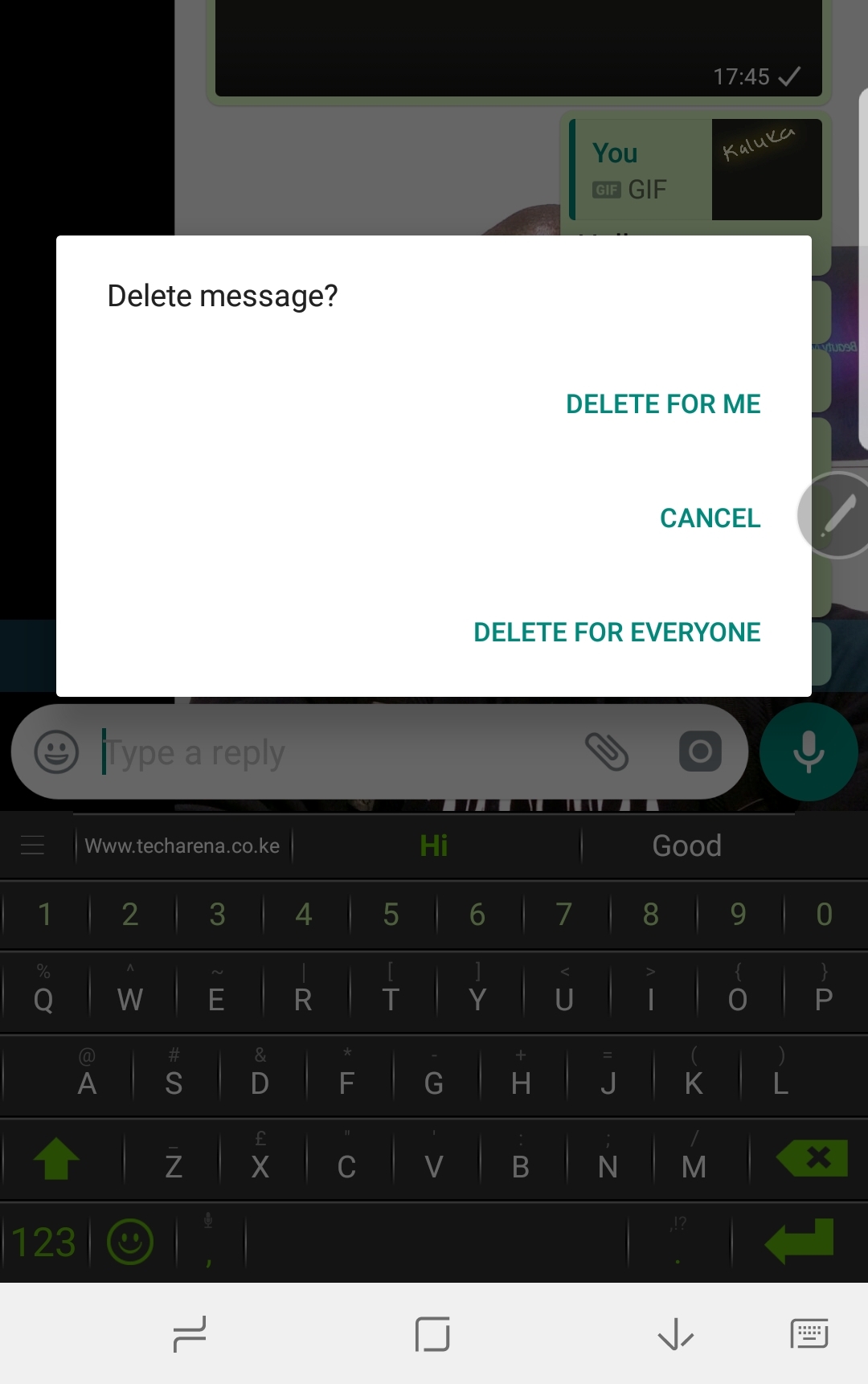
    WhatsApp delete message

    If you choose “Delete for me”, the message will only be deleted on your end. This is the same option we have had for sometime on WhatsApp. On the other hand, if you choose “Delete for everyone”, you will delete the message from recipients’ chat windows. In addition to this, the message will be replaced by “You deleted this message” on your end and “This message was deleted” on the recipient.
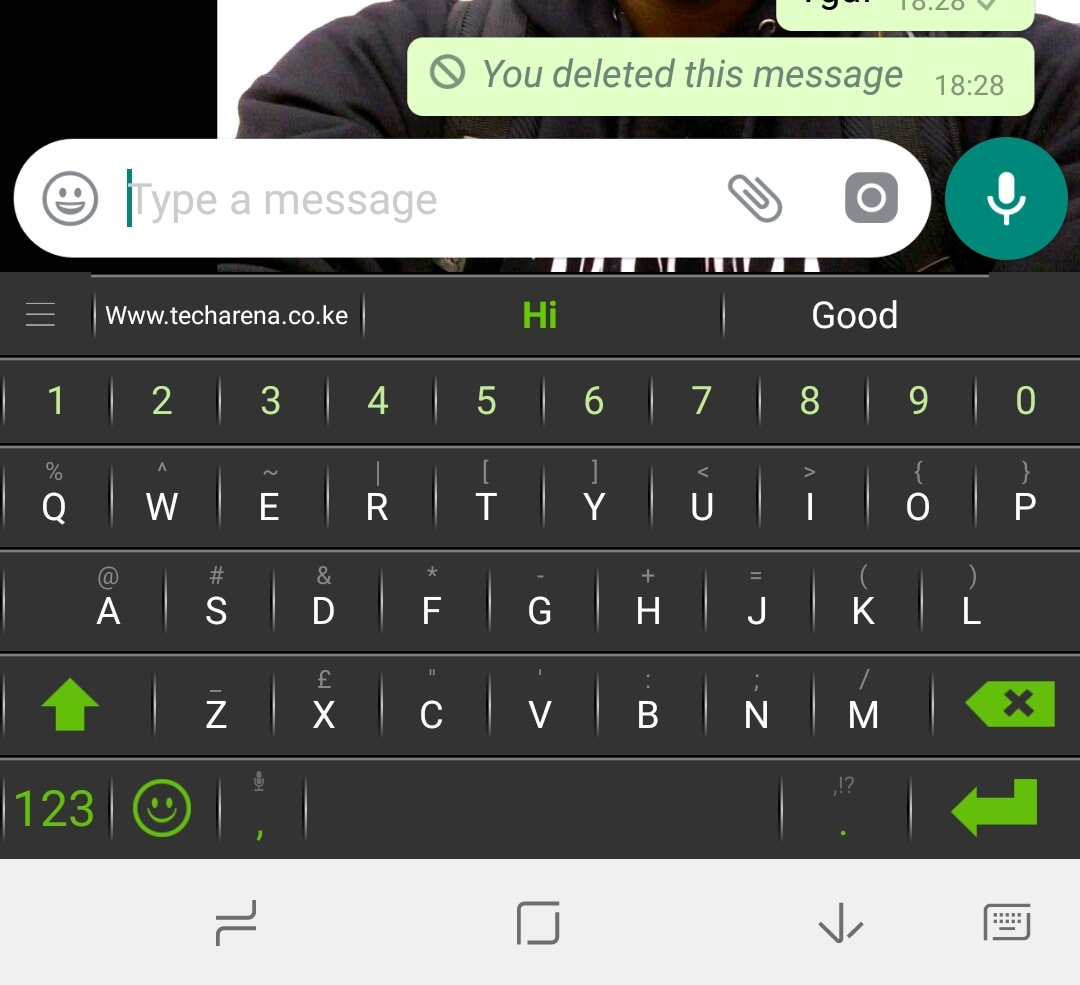
    delete whatsapp messages

    Now that we have covered the basics, it is important to know that the ‘delete for everyone’ option only works within the first seven minutes of sending the message. After that, you will not be able to delete the message even if the recipient has not read it. WhatsApp has also pointed out that deleting the message does not guarantee that the message will not be seen by the recipient. This can happen even if you delete the message on your end or if deletion was not successful. You will not get any notification if deleting for everyone is not successful.

    To be able to delete messages for everyone, both you and the recipient must be using the latest version of WhatsApp for Android, iPhone or Windows Phone. This feature has just started rolling out and not everyone has it at the moment so don’t be surprised if it doesn’t work just yet.

    Leave Groups Quietly

    Now that we can delete messages we have sent, isn’t it time for WhatsApp to make it possible for users to leave groups without broadcasting that to everyone? I think this is a much needed addition.

    Also Read: How To Delete WhatsApp Messages That You Have Sent To Individuals And Groups

    whatsapp WhatsApp for Android
    Kaluka wanjala
    • Website
    • Facebook
    • X (Twitter)
    • LinkedIn

    Editor at TechArena. I cover all things technology and review new gadgets as I get them. You can reach me on email: [email protected]

    Related Posts

    What You Need to Know About Ziidi Trader on M-PESA

    February 10, 2026

    TikTok for Business Is Reshaping How Kenyan Brands Do Digital Advertising

    February 3, 2026

    MYDAWA Stabilizes Platform After Major Upgrade

    December 18, 2025

    1 Comment

    1. James Irungu on October 30, 2017 1:01 pm

      This a good one.

    Latest Posts

    What You Need to Know About Ziidi Trader on M-PESA

    February 10, 2026

    Wimbart Launches “Wimbart Lite” to Support Africa’s Early-Stage Startups Raising Under $1M

    February 10, 2026

    NCBA Becomes First Bank in East & Central Africa to Achieve Dual ISO 27001 and 27701 Certifications

    February 9, 2026

    Watu Backs Kenya’s New E-Mobility Policy as Catalyst for EV Financing and Clean Transport Growth

    February 9, 2026
    Advertisement
    Editor's Pick

    Deepfake Scams and AI-Generated Malware Are Now Top Cyber Risks for Kenya, ESET Warns

    February 5, 2026

    The Smartphone as an AI Platform: What On-Device AI Really Means for Africa

    February 4, 2026

    What You Need to Know About Kenya’s National Electric Mobility Policy (e-Mobility Policy)

    February 4, 2026

    How Data Centers Are Reshaping Africa’s Power Market

    February 2, 2026
    © 2026 TechArena.. All rights reserved.
    • Home
    • Startups
    • Reviews

    Type above and press Enter to search. Press Esc to cancel.