


Close Menu

    Subscribe to Updates

    Get the latest tech news

    Facebook X (Twitter) Instagram
    TechArenaTechArena
    • Home
    • News
    • Reviews
    • Features
      • Top 5
    • Startups
    • Contact
    Facebook X (Twitter) Instagram
    TechArenaTechArena
    Home»Apps»You can now quote WhatsApp messages you want to respond to
    Apps

    You can now quote WhatsApp messages you want to respond to

    Kaluka wanjalaBy Kaluka wanjalaJune 13, 2016Updated:June 13, 20162 Mins Read
    Facebook Twitter Telegram LinkedIn WhatsApp Email Pinterest
    WhatsApp
    WhatsApp
    Share
    Facebook Twitter LinkedIn WhatsApp Telegram

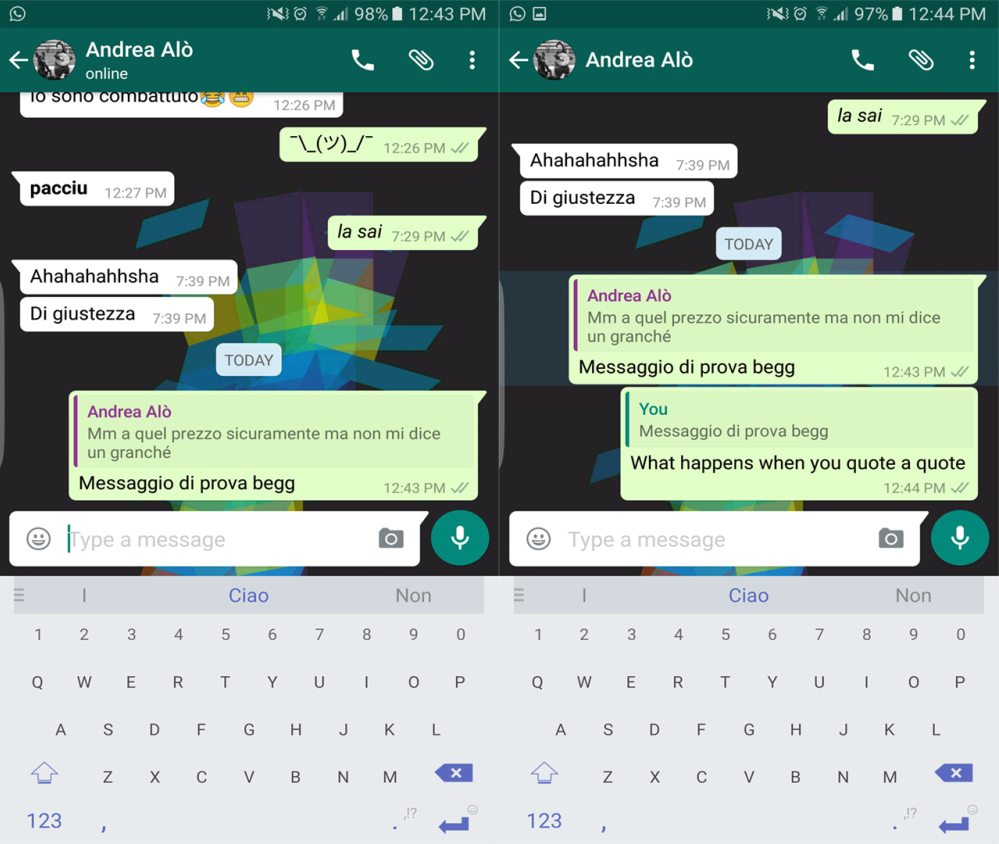
    WhatsApp is making some changes on its platform to improve your experience when using its app. The company is introducing quoted messages that will allow you to reply to specific messages whether chatting to one person in a one on one conversation or in a group conversation. This feature will be very important in group settings as you will be able to reply to one person even if there are several messages from other group member. It makes it easier for the other parties in the group to know what you are replying to.

    This feature has been rolling out to the beta version of the app but some people with the current public version of WhatsApp for Android (version 2.16.95). Surprising enough, this feature doesn’t require an update as I have seen it on my version which is the one currently available on the Play Store. If you don’t have it on your device, you will have to wait a few more days to get it or you can just uninstall and reinstall the app.
    WhatsApp quote replys

    To be able to quote a previously sent message in your reply, just long press on it till some message settings appear at the top section. Tap on the reply arrow and this will quote the message from where you can type what you want to accompany the quote. You can also quote your own messages if you want to reiterate the message you had sent earlier.

    At the moment, you can only quote a single message so you will have to do it over and over again if you want to quote multiple messages. This feature is also much more useful in group chats than it is in one on one conversations.

    For those who have used Telegram, you may have seen this feature over there and it seems like WhatsApp is just catching up. Telegram has always set the pace when it comes to instant messaging apps and even though WhatsApp is the most popular instant messaging app out there, Telegram has always been one step ahead.

    Read More: Telegram’s Latest Update Allows You to Edit Sent Messages

    Telegram whatsapp
    Kaluka wanjala
    • Website
    • Facebook
    • X (Twitter)
    • LinkedIn

    Editor at TechArena. I cover all things technology and review new gadgets as I get them. You can reach me on email: [email protected]

    Related Posts

    Binance Launches ‘Binance Junior’ Crypto Savings Account for Kids and Teens 

    December 3, 2025

    Bolt and Gebeya Partner to Offer Affordable Transport to Africa’s Service Workforce

    December 3, 2025

    Safaricom Ethiopia Launches M-PESA LeHulum, a Telco-Agnostic Mobile Money Platform for All Ethiopians

    December 2, 2025

    Comments are closed.

    Latest Posts

    Huawei DigiTruck Programme Launched in Dagoretti North

    December 15, 2025

    Expanding Canon EMEA’s Coral Conservation Initiative into East Africa

    December 15, 2025

    Tsedey Bank Selects Nutanix Cloud Platform to Modernise Banking Infrastructure

    December 15, 2025

    HealthX Introduces KES 15-a-Day Digital Health Cover for Boda Boda Riders

    December 15, 2025
    Advertisement
    Editor's Pick

    Inside Ampersand the Startup Powering East Africa’s Electric Motorcycles

    December 11, 2025

    What You Need to Know About KCB and Visa’s New Tap to Phone Payment Solution in Kenya

    December 11, 2025

    Accelerated entry: How East Africa Leapfrogged into the Cloud Age

    December 11, 2025

    How Buying Data on M-PESA Opened New Doors for Sheila

    December 10, 2025
    © 2025 TechArena.. All rights reserved.
    • Home
    • Startups
    • Reviews

    Type above and press Enter to search. Press Esc to cancel.