


Close Menu

    Subscribe to Updates

    Get the latest tech news

    Facebook X (Twitter) Instagram
    TechArenaTechArena
    • Home
    • News
    • Reviews
    • Features
      • Top 5
    • Startups
    • Contact
    Facebook X (Twitter) Instagram
    TechArenaTechArena
    Home»Apps»Google Updates its Keyboard App for Android Adding Some Much needed UI Changes
    Apps

    Google Updates its Keyboard App for Android Adding Some Much needed UI Changes

    Kaluka wanjalaBy Kaluka wanjalaMay 4, 2016Updated:August 15, 20252 Mins Read
    Facebook Twitter Telegram LinkedIn WhatsApp Email Pinterest
    Google Keyboard
    Google Keyboard
    Share
    Facebook Twitter LinkedIn WhatsApp Telegram

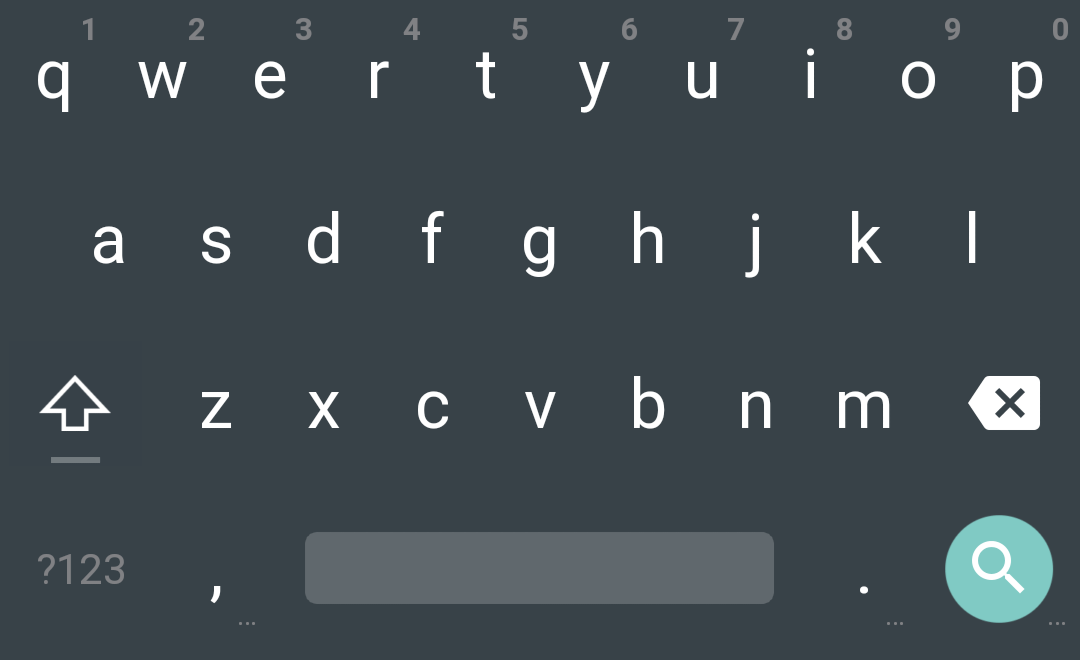
    Google Keyboard app for Android is getting updated to include some needed UI changes that some users have requested. The changes with the updated app are more to do with the UI and am particularly interested in these as I never use the Google keyboard since I don’t find it appealing to my eyes. I always download SwiftKey Keyboard with every new Android phone I get and I rarely use Google keyboard.

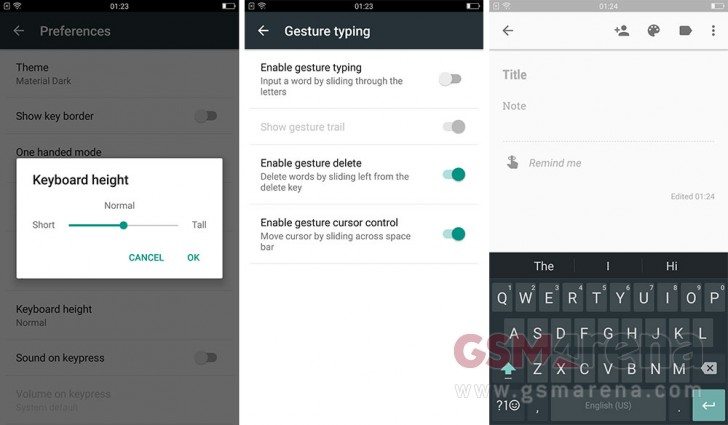
    The new updated Google keyboard does not include the Holo themes and now you are only left light and dark Material Design themes. You also have the option of enabling borders for keys if you wish and this means that you do not get the default plain surface look. Personally am for the plan surface look as it is more appealing to the eyes.
    Googlekeyboard

    The new update also brings some changes to the keys as the emoji button has been moved inside the special character menu. There is also a new numpad button that displays the numbers in a more traditional layout. Even with this, the old number row is still there.

    With this new update, you can easily adjust the height of the keyboard and also has the one handed mode which makes the keyboard easy to use. The one handed mode moves the keys to either the left or right sides making it easier for you to reach the keys even when using the phone with one hand. This is a pretty cool feature if you ask me.

    This updated app will roll our slowly on the play store so not everyone will get it at the same time. You can get the APK and install it by yourself here if you want it right now. I will download the new keyboard and see if it gives me a better experience compared to SwiftKey.

    Read More: Android Marshmallow Adoption is on the Rise and is now installed on 7.5% of all Android Devices

    source via

    android Google google keyboard
    Kaluka wanjala
    • Website
    • Facebook
    • X (Twitter)
    • LinkedIn

    Editor at TechArena. I cover all things technology and review new gadgets as I get them. You can reach me on email: [email protected]

    Related Posts

    Binance Launches ‘Binance Junior’ Crypto Savings Account for Kids and Teens 

    December 3, 2025

    Bolt and Gebeya Partner to Offer Affordable Transport to Africa’s Service Workforce

    December 3, 2025

    Safaricom Ethiopia Launches M-PESA LeHulum, a Telco-Agnostic Mobile Money Platform for All Ethiopians

    December 2, 2025

    Comments are closed.

    Latest Posts

    Send App by Flutterwave Launches Travel Card for Nigerians in Diaspora

    December 5, 2025

    LOOP Unveils New Device Financing Service in Partnership with bolttech

    December 5, 2025

    Access Bank Kenya and National Bank of Kenya Launch W Initiative to Expand Financing for Women Entrepreneurs

    December 5, 2025

    Genetec predicts top physical security trends for 2026

    December 5, 2025
    Advertisement
    Editor's Pick

    Sovereignty emerges as the defining cloud challenge for EMEA enterprises

    December 2, 2025

    [Op-Ed] Unlocking Peak Productivity: Three steps to unlocking the agentic enterprise future

    December 1, 2025

    How Safaricom’s Digital Infrastructure is Helping Kenyan Businesses Build Resilience

    November 28, 2025

    The next outage is coming – is your organisation prepared?

    November 27, 2025
    © 2025 TechArena.. All rights reserved.
    • Home
    • Startups
    • Reviews

    Type above and press Enter to search. Press Esc to cancel.