



Close Menu

    Subscribe to Updates

    Get the latest tech news

    Facebook X (Twitter) Instagram
    TechArenaTechArena
    • Home
    • News
    • Reviews
    • Features
      • Top 5
    • Startups
    • Contact
    Facebook X (Twitter) Instagram
    TechArenaTechArena
    Home»Apps»APP OF THE WEEK: Pushbullet
    Apps

    APP OF THE WEEK: Pushbullet

    Saruni MainaBy Saruni MainaApril 18, 2016Updated:August 14, 20252 Mins Read
    Facebook Twitter Telegram LinkedIn WhatsApp Email Pinterest
    apple virtual reality1
    apple virtual reality1
    Share
    Facebook Twitter LinkedIn WhatsApp Telegram

    Whenever I am working on my computer I found myself wasting a lot of time because I kept checking my phone – No, I am not addicted to my phone, but I always have the urge to check what that notification that came in is, and maybe even reply to some of them. Thanks to Technology, you can access most social networks such as WhatsApp, Telegram and Viber through your computer. What about texts? Calls?

    Read More: Telegram vs WhatsApp… Should You Switch?

    Pushbullet connects all your devices, so you can easily have access to notifications when you’re still on your computer without the need to check your phone. Here’s a list of features that Pushbullet has:

    • Conveniently send and receive SMS messages from your computer
    • See all of your phone’s notifications on your computer, including phone calls
    • Dismiss a notification on your computer and it goes away on your phone too
    • Text from your computer using your keyboard instead of grabbing your phone
    • Reply to messages from many popular apps including WhatsApp, Kik, and Facebook Messenger
    • Easily share links and files between your devices, or with friends
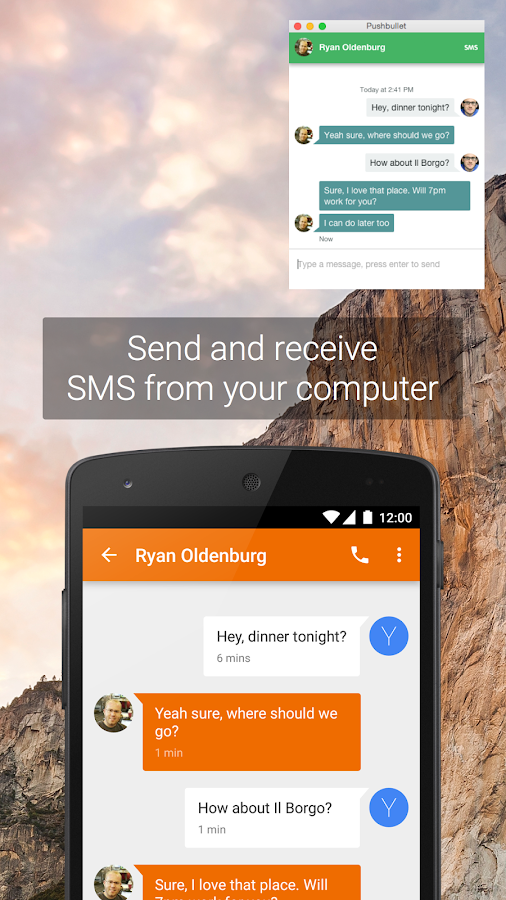
    Pushbullet is a convinient tool, that I personally found to save time as I didn’t have to constantly check my phone.
    It works across multiple devices, meaning your iOS, Windows and Android devices can finally work together.
    It is easy to set up Pushbullet, all you have to do is to download the app on the devices you want connected and also download it on your computer.
    If you’re like me, always on your computer this is the way to go. You will actually enjoy using this amazing app.

    Download Pushbullet for Android, iOS and PC

    Last Week’s App: Medicine Time! (Never forget to take your medication again)

    App of the week
    Saruni Maina
    • Website
    • Facebook
    • X (Twitter)

    I'm all about mobile apps, gadgets and smartphones. I tell you what's worth getting and what sucks!

    Related Posts

    Binance Launches ‘Binance Junior’ Crypto Savings Account for Kids and Teens 

    December 3, 2025

    Bolt and Gebeya Partner to Offer Affordable Transport to Africa’s Service Workforce

    December 3, 2025

    Safaricom Ethiopia Launches M-PESA LeHulum, a Telco-Agnostic Mobile Money Platform for All Ethiopians

    December 2, 2025

    Comments are closed.

    Latest Posts

    Send App by Flutterwave Launches Travel Card for Nigerians in Diaspora

    December 5, 2025

    LOOP Unveils New Device Financing Service in Partnership with bolttech

    December 5, 2025

    Access Bank Kenya and National Bank of Kenya Launch W Initiative to Expand Financing for Women Entrepreneurs

    December 5, 2025

    Genetec predicts top physical security trends for 2026

    December 5, 2025
    Advertisement
    Editor's Pick

    Sovereignty emerges as the defining cloud challenge for EMEA enterprises

    December 2, 2025

    [Op-Ed] Unlocking Peak Productivity: Three steps to unlocking the agentic enterprise future

    December 1, 2025

    How Safaricom’s Digital Infrastructure is Helping Kenyan Businesses Build Resilience

    November 28, 2025

    The next outage is coming – is your organisation prepared?

    November 27, 2025
    © 2025 TechArena.. All rights reserved.
    • Home
    • Startups
    • Reviews

    Type above and press Enter to search. Press Esc to cancel.