


Close Menu

    Subscribe to Updates

    Get the latest tech news

    Facebook X (Twitter) Instagram
    TechArenaTechArena
    • Home
    • News
    • Reviews
    • Features
      • Top 5
    • Startups
    • Contact
    Facebook X (Twitter) Instagram
    TechArenaTechArena
    Home»Apps»Google Lens Now Provides Translation Offline
    Apps

    Google Lens Now Provides Translation Offline

    Alvin WanjalaBy Alvin WanjalaJanuary 27, 20212 Mins Read
    Facebook Twitter Telegram LinkedIn WhatsApp Email Pinterest
    Google app
    Google app
    Share
    Facebook Twitter LinkedIn WhatsApp Telegram

    Google Lens packs the best of Google’s image recognition technology. Text translation is one of the handy features provided by Google Lens, and with the recent update, it’s getting even better.

    Since last year, after working hard to add support for offline translation, the feature is now live on Android. Google Lens’ latest Android update now supports offline translation with one catch – you must manually download the language packs.

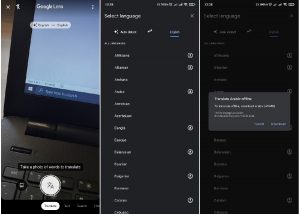
    After opening the app, go to the Translate tab and select the language pair from the hanging language pairing pill that takes you to the Select Language page. On this page, you download the variety of language packs available that can be used offline.
    Google Lens Offline Translation
    Google Lens Offline Translation

    But, offline translation support is handy to users who may be on limited data plans. Or for travelers when they visit areas of poor network connectivity.

    The only caveat is that not all languages available for online translation can be downloaded to work offline. In any case, the majority of language packs can be downloaded offline. Google has indicated downloadable language packages with a download button on the side(check image above).

    Keep in mind that this will use your devices’ storage, so ensure you have enough – most language packs are between 40MB to 50MB. Google Lens will show you the exact download size of your desired language pack and, alongside that, the amount of storage available on your device.

    Google may likely prompt users to clear storage to create more room if they have a small amount left – the same way it works with downloading Google Play apps.

    Read Next: Google Redesigns Search on Mobile

    Google Google Lens
    Alvin Wanjala
    • Facebook
    • X (Twitter)
    • Instagram

    Alvin Wanjala has been writing about technology for over 2 years(and counting). He writes about different topics in the consumer tech space. He loves streaming music, programming, and gaming during downtimes.

    Related Posts

    Airtel Money Partners With I&M Bank To Expand Digital Payments Reach Across Kenya

    December 11, 2025

    Fincra Named Headline Supporter for Africa Tech Summit Nairobi 2026

    December 11, 2025

    NTT DATA’s 2026 Global AI Report shows how top performers turn AI vision into value

    December 11, 2025

    Comments are closed.

    Latest Posts

    Inside Ampersand the Startup Powering East Africa’s Electric Motorcycles

    December 11, 2025

    Visa Showcases 22 Startups at Africa Fintech Accelerator Demo Day in Cape Town

    December 11, 2025

    Airtel Money Partners With I&M Bank To Expand Digital Payments Reach Across Kenya

    December 11, 2025

    Fincra Named Headline Supporter for Africa Tech Summit Nairobi 2026

    December 11, 2025
    Advertisement
    Editor's Pick

    Inside Ampersand the Startup Powering East Africa’s Electric Motorcycles

    December 11, 2025

    What You Need to Know About KCB and Visa’s New Tap to Phone Payment Solution in Kenya

    December 11, 2025

    Accelerated entry: How East Africa Leapfrogged into the Cloud Age

    December 11, 2025

    How Buying Data on M-PESA Opened New Doors for Sheila

    December 10, 2025
    © 2025 TechArena.. All rights reserved.
    • Home
    • Startups
    • Reviews

    Type above and press Enter to search. Press Esc to cancel.