


Close Menu

    Subscribe to Updates

    Get the latest tech news

    Facebook X (Twitter) Instagram
    TechArenaTechArena
    • Home
    • News
    • Reviews
    • Features
      • Top 5
    • Startups
    • Contact
    Facebook X (Twitter) Instagram
    TechArenaTechArena
    Home»Apps»Chrome for Android Testing a Download Scheduling Feature
    Apps

    Chrome for Android Testing a Download Scheduling Feature

    Alvin WanjalaBy Alvin WanjalaJuly 20, 2020Updated:August 15, 20252 Mins Read
    Facebook Twitter Telegram LinkedIn WhatsApp Email Pinterest
    Chrome mobile app
    Chrome mobile app
    Share
    Facebook Twitter LinkedIn WhatsApp Telegram

    Google chrome is testing a download later feature that lets you schedule downloads on Android. Imagine setting your browser to download a specific file at certain date and specific time of the day?

    That is exactly what Chrome for Android is testing. Even more useful is the ability to schedule a download to start the next time your device is connected to Wi-Fi.

    Although it’s not yet available yet, the feature offers three options to choose from when you want to download a file. You can choose to download a file Now, when you’re on Wi-Fi or at a specific date and time. There’s also an option to select the download location.

    Scheduled downloads on Chrome will be seen via a “Scheduled for later” tab which will also allow you to manage those downloads. From the “Scheduled for later” tab, you will be able to pause, start, and also cancel scheduled file downloads as you wish.
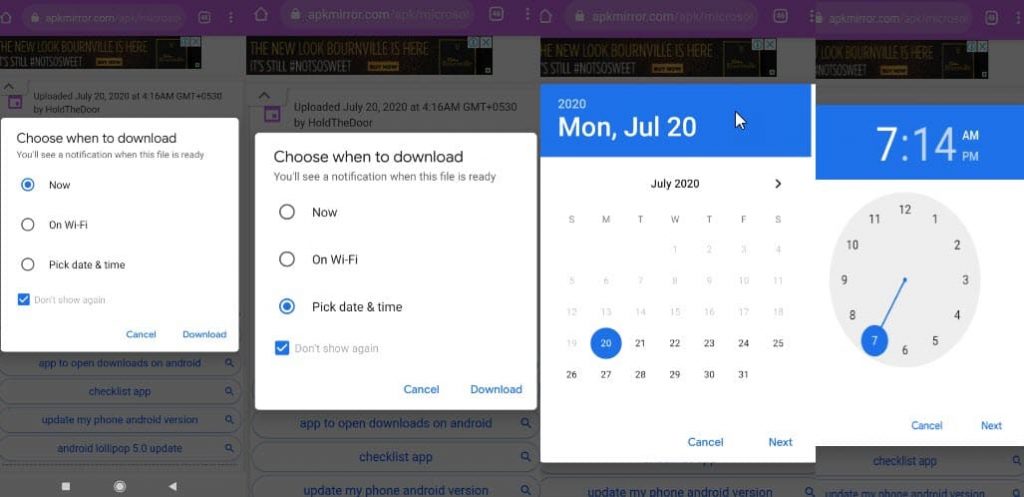
    Download later feature on Chrome Android (Image Credits:Techdows)

    Availability

    The download later feature is currently available in Chrome Canary 86 under Chrome flags. So, it’s not clear when the feature will be available in the stable version of Chrome and to everyone.

    However, if you’re one of those who get to try early versions of Chrome, ensure you have downloaded Chrome Canary 86 and enable the feature by following these steps;

    • Go to chrome://flags
    • Search for “enable downloads later”
    • Select “Enabled” from the drop-down menu and restart your browser.
    Google google chrome
    Alvin Wanjala
    • Facebook
    • X (Twitter)
    • Instagram

    Alvin Wanjala has been writing about technology for over 2 years(and counting). He writes about different topics in the consumer tech space. He loves streaming music, programming, and gaming during downtimes.

    Related Posts

    Google Opens Applications for 10th Cohort of Startups Accelerator Africa

    February 5, 2026

    LG Electronics Sets Strategic Direction to Drive Growth, Innovation and Profitability

    February 5, 2026

    Old Mutual Partners with Paystack to Strengthen Digital Payments Across Its Insurance and Investment Platforms

    February 4, 2026

    Comments are closed.

    Latest Posts

    Google Opens Applications for 10th Cohort of Startups Accelerator Africa

    February 5, 2026

    LG Electronics Sets Strategic Direction to Drive Growth, Innovation and Profitability

    February 5, 2026

    Old Mutual Partners with Paystack to Strengthen Digital Payments Across Its Insurance and Investment Platforms

    February 4, 2026

    The Smartphone as an AI Platform: What On-Device AI Really Means for Africa

    February 4, 2026
    Advertisement
    Editor's Pick

    The Smartphone as an AI Platform: What On-Device AI Really Means for Africa

    February 4, 2026

    What You Need to Know About Kenya’s National Electric Mobility Policy (e-Mobility Policy)

    February 4, 2026

    How Data Centers Are Reshaping Africa’s Power Market

    February 2, 2026

    Samsung Galaxy Tab A11 Series is Redefining Education for Kenya’s Next Generation

    January 30, 2026
    © 2026 TechArena.. All rights reserved.
    • Home
    • Startups
    • Reviews

    Type above and press Enter to search. Press Esc to cancel.