


Close Menu

    Subscribe to Updates

    Get the latest tech news

    Facebook X (Twitter) Instagram
    TechArenaTechArena
    • Home
    • News
    • Reviews
    • Features
      • Top 5
    • Startups
    • Contact
    Facebook X (Twitter) Instagram
    TechArenaTechArena
    Home»Apps»Microsoft’s Your Phone App For Windows 10 Now Allows More Android Users to Make Calls from their PC
    Apps

    Microsoft’s Your Phone App For Windows 10 Now Allows More Android Users to Make Calls from their PC

    Alvin WanjalaBy Alvin WanjalaDecember 12, 20192 Mins Read
    Facebook Twitter Telegram LinkedIn WhatsApp Email Pinterest
    your phone app
    your phone app
    Share
    Facebook Twitter LinkedIn WhatsApp Telegram

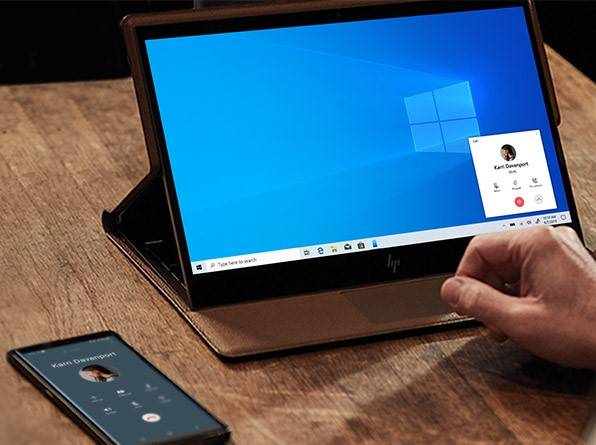
    Your Phone app is Microsoft’s plan to bring common ground and seamless integration between Android users and their Windows-powered PCs. You could say it is an imitation to the macOS-iOS experience. But Your Phone supports the iPhone, too.

    Since the company rolled out the ability to make calls via Your Phone App, it was exceptional to some lucky few using Samsung Galaxy phones and, at the same time, under the Windows Insider program.

    Calling was first rolled out in August, exclusively for the Galaxy Note 10 at first. But this has been gradually brought on other phones as well, majorly Galaxy phones though.

    This feature is now available to be used, presumably by all Android users as long as you’re running at least Android version 7.0 Nougat. Also, your PC needs to be running at least Windows 10 version 1803 or later.

    Thank you #WindowsInsiders for your feedback over the last couple of months. Today, we're pleased to announce the general availability of the #YourPhone app Calls feature, which allows you to receive and make phone calls on your PC: https://t.co/m47kLcXgbS pic.twitter.com/4GuIOXjR71

    — Windows Insider Program (@windowsinsider) December 11, 2019

    The setup process is simple; download Your Phone app then sign in using a similar account logged in your PC. Open Your Phone on both your PC and Android. First sign in to the mobile version of the app. After that, the PC version will automatically detect a sign in, and you will be taken through a verification process.

    When all is set, you will now be able to check your messages, notifications, battery percentage, make calls(if your device is supported) and even view photos directly from your PC.

    For Galaxy Phones, Your Phone app can even do more. In an update rolled out in October, Microsoft released a new feature that lets users mirror their phones to the PC and even control phone apps from the PC. That, as per now, is only available to few select Galaxy Phones including Samsung Galaxy S10, S10+, S10e, S10 5G, and the Galaxy Fold.

    Even for the newly rolled out calling capability, don’t be surprised if you cannot see it. I went through the whole process, but the calling capability is not yet available on my end. I’m not the only one who has not seen the feature despite the announcement. Some users have also complained about the same on Twitter.

    Microsoft windows 10
    Alvin Wanjala
    • Facebook
    • X (Twitter)
    • Instagram

    Alvin Wanjala has been writing about technology for over 2 years(and counting). He writes about different topics in the consumer tech space. He loves streaming music, programming, and gaming during downtimes.

    Related Posts

    250 Youth in Dagoretti North Graduate from Huawei’s DigiTruck Digital Skills Programme

    December 19, 2025

    UAE’s $1B AI for Development Fund Opens Door for Kenya’s National AI Strategy

    December 19, 2025

    Qualcomm Announces Successful Completion of Make in Africa Startup Mentorship Program 2025

    December 19, 2025

    Comments are closed.

    Latest Posts

    BongoBongo: Leading Online Sports Betting Operator in Kenya

    December 24, 2025

    When Should Startups Start Automating Tests?

    December 23, 2025

    Ethereum Price: A Comprehensive Guide to Understanding Its Value

    December 23, 2025

    How Casino Bonuses Define Your Experience in Online Casinos

    December 22, 2025
    Advertisement
    Editor's Pick

    TechArena to Break New Documentary Series Telling Africa’s Blockchain and AI Story From Nairobi

    December 18, 2025

    [Op-Ed] How Safaricom Is Helping Enterprises Build Cyber Resilience

    December 17, 2025

    [Op-Ed] From Generative to Agentic: How Kenya’s AI Future Will Be Built on Trust, Data and Practical Automation

    December 16, 2025

    Inside Ampersand the Startup Powering East Africa’s Electric Motorcycles

    December 11, 2025
    © 2025 TechArena.. All rights reserved.
    • Home
    • Startups
    • Reviews

    Type above and press Enter to search. Press Esc to cancel.