



Close Menu

    Subscribe to Updates

    Get the latest tech news

    Facebook X (Twitter) Instagram
    TechArenaTechArena
    • Home
    • News
    • Reviews
    • Features
      • Top 5
    • Startups
    • Contact
    Facebook X (Twitter) Instagram
    TechArenaTechArena
    Home»Features»Here’s How You Can Upload Photos on Instagram For Web
    Features

    Here’s How You Can Upload Photos on Instagram For Web

    Kaluka wanjalaBy Kaluka wanjalaSeptember 16, 2019Updated:September 16, 20193 Mins Read
    Facebook Twitter Telegram LinkedIn WhatsApp Email Pinterest
    Instagram
    Instagram
    Share
    Facebook Twitter LinkedIn WhatsApp Telegram

    Instagram was a mobile-first platform and up until now, it has some features that you can only use on its mobile platform and can’t access them when using the desktop version.

    Uploading a photo is one feature that is available through the official Instagram apps but not on the desktop version. In this post, I will show you how you can upload photos to your Instagram Account even when using the desktop app. You cannot fault Instagram for not having an option to upload photos for desktop users as what is there already works really well for many people. Even with that said, there are those who want other options and they should be able to get them.

    Note: I am going to show you how to do so when using Chrome as we do have an extension that supports that.

    Get ‘Downloader for Instagram’ Extension

    To get started, open the Chrome browser and navigate to Settings then Extensions and go to the Chrome Web Store. You can alternatively go to this link and search for Downloader for Instagram extension. Click on ‘Add to Chrome’ and the browser will handle the rest for you.

    Ready to Upload

    With the extension successfully installed, you will be able to upload photos to your feed when on the desktop version of Instagram. To do so, Log in to your account if you haven’t already and then navigate to your profile, you will be able to upload photos from here.
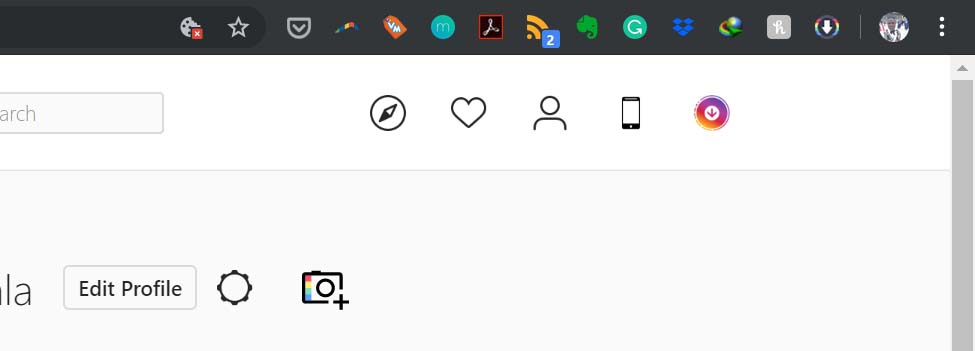
    Instagram downloader

    When on your profile, you will see a camera icon next to the ‘Edit Profile’ tab, tap on that and choose if you want to upload the photo to your feed or to Stories. You can only upload photos (jpeg format) at the moment so keep that in mind if you plan to use this feature.

    Another way to go about it is to tap on the mobile icon on the homepage and this will open Instagram’s desktop interface and you can tap on the ‘+’ icon on the bottom of the screen. This gives you the same experience you would get when uploading photos on your phone.

    Extra features

    Besides uploading photos, this extension let’s you download Stories posted by your friends. Through it, you can also watch Instagram Live broadcasts by your friends when on the web version of Instaagram.

    If you are going to Install this extension, you do not have to have it activated all the time, you can choose to activate it when you need to use its features and deactivate it afterwards.  

    Now Read: Instagram is Reportedly Working on Another Messaging App

    instagram
    Kaluka wanjala
    • Website
    • Facebook
    • X (Twitter)
    • LinkedIn

    Editor at TechArena. I cover all things technology and review new gadgets as I get them. You can reach me on email: [email protected]

    Related Posts

    Sovereignty emerges as the defining cloud challenge for EMEA enterprises

    December 2, 2025

    [Op-Ed] Unlocking Peak Productivity: Three steps to unlocking the agentic enterprise future

    December 1, 2025

    How Safaricom’s Digital Infrastructure is Helping Kenyan Businesses Build Resilience

    November 28, 2025

    Comments are closed.

    Latest Posts

    Send App by Flutterwave Launches Travel Card for Nigerians in Diaspora

    December 5, 2025

    LOOP Unveils New Device Financing Service in Partnership with bolttech

    December 5, 2025

    Access Bank Kenya and National Bank of Kenya Launch W Initiative to Expand Financing for Women Entrepreneurs

    December 5, 2025

    Genetec predicts top physical security trends for 2026

    December 5, 2025
    Advertisement
    Editor's Pick

    Sovereignty emerges as the defining cloud challenge for EMEA enterprises

    December 2, 2025

    [Op-Ed] Unlocking Peak Productivity: Three steps to unlocking the agentic enterprise future

    December 1, 2025

    How Safaricom’s Digital Infrastructure is Helping Kenyan Businesses Build Resilience

    November 28, 2025

    The next outage is coming – is your organisation prepared?

    November 27, 2025
    © 2025 TechArena.. All rights reserved.
    • Home
    • Startups
    • Reviews

    Type above and press Enter to search. Press Esc to cancel.