



Instagram was a mobile-first platform and up until now, it has some features that you can only use on its mobile platform and can’t access them when using the desktop version.
Uploading a photo is one feature that is available through the official Instagram apps but not on the desktop version. In this post, I will show you how you can upload photos to your Instagram Account even when using the desktop app. You cannot fault Instagram for not having an option to upload photos for desktop users as what is there already works really well for many people. Even with that said, there are those who want other options and they should be able to get them.
Note: I am going to show you how to do so when using Chrome as we do have an extension that supports that.
Get ‘Downloader for Instagram’ Extension
To get started, open the Chrome browser and navigate to Settings then Extensions and go to the Chrome Web Store. You can alternatively go to this link and search for Downloader for Instagram extension. Click on ‘Add to Chrome’ and the browser will handle the rest for you.
Ready to Upload
With the extension successfully installed, you will be able to upload photos to your feed when on the desktop version of Instagram. To do so, Log in to your account if you haven’t already and then navigate to your profile, you will be able to upload photos from here.
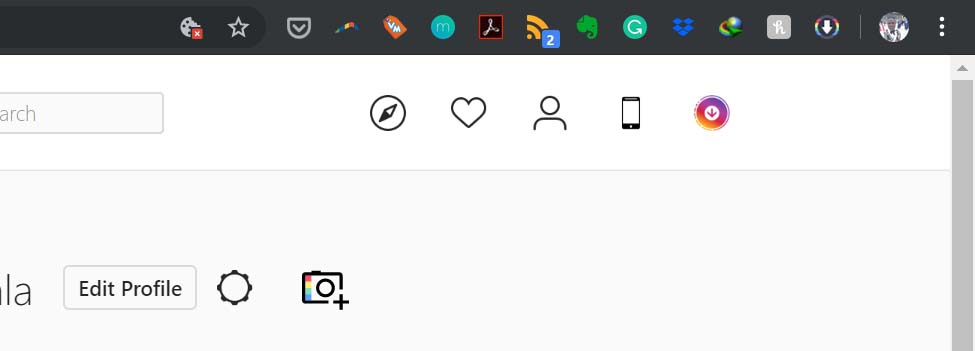
When on your profile, you will see a camera icon next to the ‘Edit Profile’ tab, tap on that and choose if you want to upload the photo to your feed or to Stories. You can only upload photos (jpeg format) at the moment so keep that in mind if you plan to use this feature.
Another way to go about it is to tap on the mobile icon on the homepage and this will open Instagram’s desktop interface and you can tap on the ‘+’ icon on the bottom of the screen. This gives you the same experience you would get when uploading photos on your phone.
Extra features
Besides uploading photos, this extension let’s you download Stories posted by your friends. Through it, you can also watch Instagram Live broadcasts by your friends when on the web version of Instaagram.
If you are going to Install this extension, you do not have to have it activated all the time, you can choose to activate it when you need to use its features and deactivate it afterwards.
Now Read: Instagram is Reportedly Working on Another Messaging App
