



Close Menu

    Subscribe to Updates

    Get the latest tech news

    Facebook X (Twitter) Instagram
    TechArenaTechArena
    • Home
    • News
    • Reviews
    • Features
      • Top 5
    • Startups
    • Contact
    Facebook X (Twitter) Instagram
    TechArenaTechArena
    Home»Apps»Instagram Adds “Bokeh camera mode” For Blurred Backgrounds In Instagram Stories
    Apps

    Instagram Adds “Bokeh camera mode” For Blurred Backgrounds In Instagram Stories

    Kaluka wanjalaBy Kaluka wanjalaApril 11, 20182 Mins Read
    Facebook Twitter Telegram LinkedIn WhatsApp Email Pinterest
    Instagram stories
    Instagram stories
    Share
    Facebook Twitter LinkedIn WhatsApp Telegram

    If you have been following the trends in smartphone cameras, then you have probably heard about the portrait mode otherwise known as Bokeh effect. This is where you have the camera focus on a subject and blur the background. The subject in focus draws all the attention as what is in the background is not easily visible.

    This feature is available in most smartphone cameras released in the last year or so and is mostly available on the rear camera but some front facing cameras also have it.

    For Instagram, this feature is too good to ignore and that is why the company is updating its app and introducing a new bokeh camera mode to its Stories camera UI. The company is calling it “Focus” and you can access it by swiping from left to right when on the homepage of your Instagram app the same way you would do when you want to create a new Instagram Story.

    This camera mode is right next to “Superzoom” and will immediately blur the background when it sees your face. You can tap once to capture an image or tap and hold to take a video. It works really well from what I have seen and does not blur my ears in a weird way.  This mode is not just for the front facing camera, it also works with the rear facing camera. Here it will also work when you have two people in the shot.
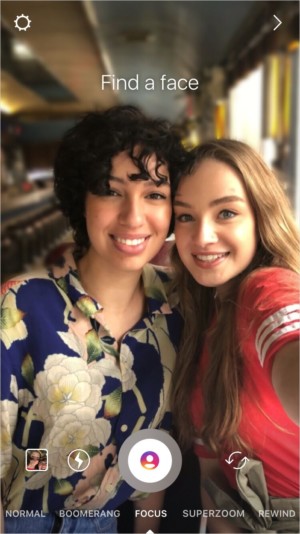
    Instagram focus

    Focus on Instagram stories is available on version 39.0 of the app for Android and iOS. The update was pushed out yesterday so you should have it on your end if you set apps to automatically update. If you have it, just to the Stories section and swipe twice to the right. Instagram says that this mode will work with a select number of devices including Apple iPhone SE, 6S, 6S Plus, 7, 7 Plus, 8, 8 Plus, X and ‘Select Android devices’. I can confirm that it works for the Samsung Galaxy S9+ and the Huawei Mate. Head over to your specific app store and grab the update and see if it works for you.

    Also Read: Expect More Ads On Your Instagram Stories

    instagram instagram stories
    Kaluka wanjala
    • Website
    • Facebook
    • X (Twitter)
    • LinkedIn

    Editor at TechArena. I cover all things technology and review new gadgets as I get them. You can reach me on email: [email protected]

    Related Posts

    MYDAWA Stabilizes Platform After Major Upgrade

    December 18, 2025

    How to Bridge your Imagination and Reality This Festive Season with Galaxy AI

    December 16, 2025

    Airtel Money Enables Direct Showmax Payments for Kenyan Subscribers

    December 16, 2025

    Comments are closed.

    Latest Posts

    OPPO A6x Specifications and Price in Kenya

    January 13, 2026

    Kenya’s Mamy Eyewear Lands Strategic Investment from Japan’s Ikemori Venture Support

    January 13, 2026

    OPPO Kenya Set to Launch Reno15 Series on 23 January

    January 13, 2026

    Microsoft Kenya Country Manager Phyllis Migwi to Exit Role After 3.5 Years

    January 13, 2026
    Advertisement
    Editor's Pick

    Looking Ahead in 2026 and the Forces that Will Shape Africa’s Digital Future

    January 12, 2026

    How to Check the 2025 KCSE Examination Results Online

    January 9, 2026

    What You Need to Know About KESONIA, Kenya’s New Benchmark Interest Rate

    January 6, 2026

    BeyondTheCode.ai at CATS Nairobi: Inside Africa’s Blockchain and AI Story

    January 1, 2026
    © 2026 TechArena.. All rights reserved.
    • Home
    • Startups
    • Reviews

    Type above and press Enter to search. Press Esc to cancel.