


Close Menu

    Subscribe to Updates

    Get the latest tech news

    Facebook X (Twitter) Instagram
    TechArenaTechArena
    • Home
    • News
    • Reviews
    • Features
      • Top 5
    • Startups
    • Contact
    Facebook X (Twitter) Instagram
    TechArenaTechArena
    Home»Apps»YouTube’s desktop site Has been redesigned With A Simple Material Design and a Dark Theme
    Apps

    YouTube’s desktop site Has been redesigned With A Simple Material Design and a Dark Theme

    Kaluka wanjalaBy Kaluka wanjalaMay 3, 20172 Mins Read
    Facebook Twitter Telegram LinkedIn WhatsApp Email Pinterest
    YouTube Redesign
    YouTube Redesign
    Share
    Facebook Twitter LinkedIn WhatsApp Telegram

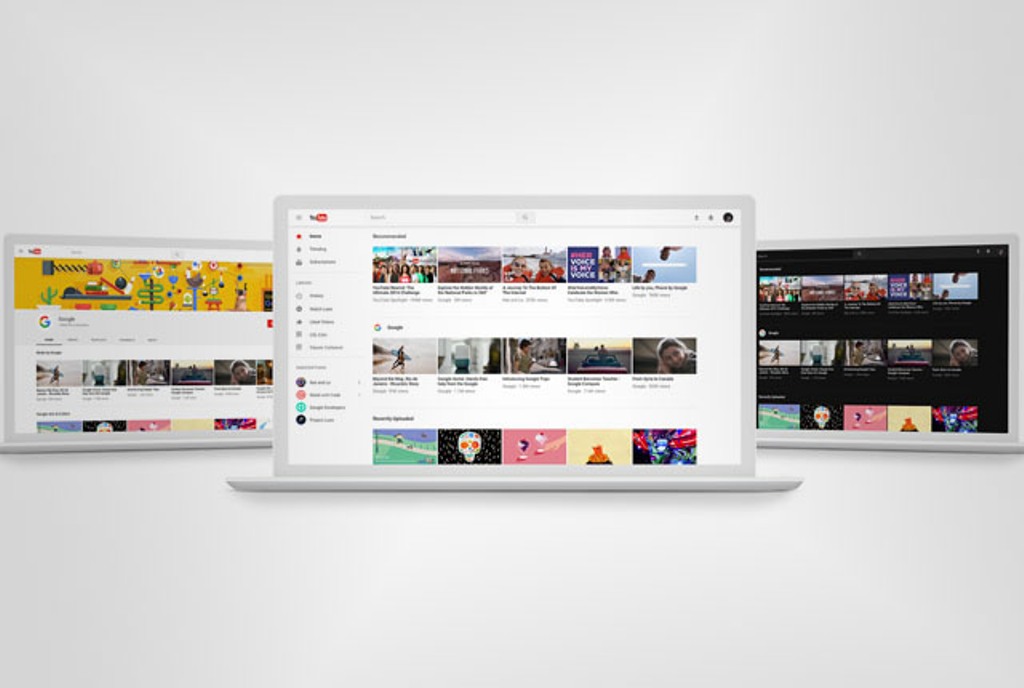
    YouTube desktop site has had its current design for as long as I can remember. If you were getting sick of the current look, worry no more as YouTube is introducing a new design for its desktop site.

    With the changes, YouTube’s desktop site is getting upgraded with Material Design that gives off a clean look that adds more white spaces to the site by getting rid of the grey areas that are currently there. With this, the site appears more flat and easy to navigate compared to what we have been used to.

    With the new design, the titles of the videos are now black and not blue as they have been before. Channel names are also a bit darker, they are currently grey but the new design makes them darker. These are subtle changes that you will definitely notice when you get this new design. Video views have also been shrunk and instead of the usual count such as 200,00 views, you now have 200K counts. Basically, the company is removing the extra 1000 to use the K symbol.

    The YouTube channel pages are also getting redesigned and now put more emphasis on the videos on the channels making it easier for you to find the video that might interest you.

    A Dark Theme

    If you know me, then you know I am a big fan of apps that have a dark theme. These themes are helpful when you are using these apps or websites at night. YouTube is now getting a dark mode that you will be able to access through the profile menu by clicking on your profile picture at the top right corner. At the moment, you can only switch to the dark mode manually and there is no option to set that to switch on and off automatically depending on the time of day.

    This new design is still rolling out and is available in preview mode. You can preview it by visiting youtube.com/new. Those who prefer the old design will still be able to do so by choosing the “Restore classic YouTube” from the account menu.

    Also Read: YouTube Go App Has Been Launched To Allow You To Download Videos For Offline Viewing

    youtube
    Kaluka wanjala
    • Website
    • Facebook
    • X (Twitter)
    • LinkedIn

    Editor at TechArena. I cover all things technology and review new gadgets as I get them. You can reach me on email: [email protected]

    Related Posts

    MYDAWA Stabilizes Platform After Major Upgrade

    December 18, 2025

    How to Bridge your Imagination and Reality This Festive Season with Galaxy AI

    December 16, 2025

    Airtel Money Enables Direct Showmax Payments for Kenyan Subscribers

    December 16, 2025

    Comments are closed.

    Latest Posts

    Zenith Bank Enters Kenya With Paramount Bank Acquisition

    January 23, 2026

    Flutterwave Launches Stablecoin Balances for Merchants Across Africa in Partnership With Turnkey and Nuvion

    January 22, 2026

    Paymentology Appoints Kesheni Moodley as Regional Director for Africa

    January 22, 2026

    How 2026 will stitch together the future of payments

    January 22, 2026
    Advertisement
    Editor's Pick

    How 2026 will stitch together the future of payments

    January 22, 2026

    5 Blockchain Trends to Watch in 2026: Insights from D24 Fintech’s CTO

    January 21, 2026

    Why SMEs Need Tailored Digital Banking Solutions

    January 20, 2026

    Meaningful AI May Matter a Lot More than Powerful AI

    January 20, 2026
    © 2026 TechArena.. All rights reserved.
    • Home
    • Startups
    • Reviews

    Type above and press Enter to search. Press Esc to cancel.