


Close Menu

    Subscribe to Updates

    Get the latest tech news

    Facebook X (Twitter) Instagram
    TechArenaTechArena
    • Home
    • News
    • Reviews
    • Features
      • Top 5
    • Startups
    • Contact
    Facebook X (Twitter) Instagram
    TechArenaTechArena
    Home»Apps»Microsoft launches the Pix Camera app for iOS
    Apps

    Microsoft launches the Pix Camera app for iOS

    Kaluka wanjalaBy Kaluka wanjalaJuly 29, 20162 Mins Read
    Facebook Twitter Telegram LinkedIn WhatsApp Email Pinterest
    gsmarena 001
    gsmarena 001
    Share
    Facebook Twitter LinkedIn WhatsApp Telegram

    Microsoft has been focusing on smartphone apps the last couple of years as it tries to make sure more and more people are using its products no matter which mobile platform they are on. The company has a number of apps that can be downloaded for free from the Apple app store and the Google play store.

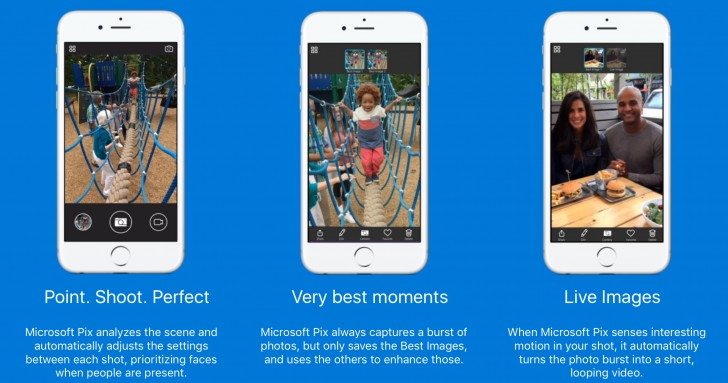
    The latest app from the company is the Microsoft Pix that is available for iOS users. This is a camera app that the company says can take better photos compared to the default camera app on your iPhone.

    Microsoft says that this app makes use of Artificial Intelligence (AI) to tweak your photos and videos you take to ensure you end up with the best of the best. When you take photos or are recording videos, Microsoft Pix will boost exposure by recognizing faces and other objects, keeps colors as accurate as possible and reduces noise to ensure the end result is something you will not be embarrassed when you share on social media.

    Microsoft Pix supports Live image similar to Apple Live photos. Microsoft has revealed that this is a much better feature than Live photos since it eliminates camera instabilities and exposure inconsistencies.

    Microsoft has revealed that Pix has been made using the same technology as its Hyperlapse app and this helps to stabilize videos. This the company says produces videos that are much better that those produced by the Apple app. This has to be proved as we cannot just take Microsoft’s word as the gospel truth.

    As for device support, the Microsoft Pix supports iOS 9 and above. This means that if you own the iPhone 5s, iPhone SE, iPhone 6, iPhone 6 Plus, iPhone 6s, and iPhone 6s Plus, you can get it on your device without any issues.

    Microsoft is yet to reveal if this app will be available on Android and Windows Phone.

    Also Read: Prisma Serve Issues Due to Overcapacity Will Be Resolved in A Couple of Days

    ios Microsoft microsoft pix
    Kaluka wanjala
    • Website
    • Facebook
    • X (Twitter)
    • LinkedIn

    Editor at TechArena. I cover all things technology and review new gadgets as I get them. You can reach me on email: [email protected]

    Related Posts

    What You Need to Know About Ziidi Trader on M-PESA

    February 10, 2026

    Absa, Microsoft and Women in Tech Expand ElevateHer AI Programme Across Nine African Markets

    February 6, 2026

    TikTok for Business Is Reshaping How Kenyan Brands Do Digital Advertising

    February 3, 2026

    Comments are closed.

    Latest Posts

    Agridex and Tradeflow Partner to Channel Institutional Capital into Kenya’s SME and Agriculture Trade

    February 12, 2026

    KCB and Visa Roll Out Business Credit Card for Kenyan SMEs

    February 12, 2026

    Konza Technopolis Joins Global ‘7 Wonders of Future Cities’ Initiative

    February 12, 2026

    LG Introduces Locally Adaptive AI Smart Home Solutions for Africa at InnoFest 2026 MEA

    February 12, 2026
    Advertisement
    Editor's Pick

    Deepfake Scams and AI-Generated Malware Are Now Top Cyber Risks for Kenya, ESET Warns

    February 5, 2026

    The Smartphone as an AI Platform: What On-Device AI Really Means for Africa

    February 4, 2026

    What You Need to Know About Kenya’s National Electric Mobility Policy (e-Mobility Policy)

    February 4, 2026

    How Data Centers Are Reshaping Africa’s Power Market

    February 2, 2026
    © 2026 TechArena.. All rights reserved.
    • Home
    • Startups
    • Reviews

    Type above and press Enter to search. Press Esc to cancel.