


Close Menu

    Subscribe to Updates

    Get the latest tech news

    Facebook X (Twitter) Instagram
    TechArenaTechArena
    • Home
    • News
    • Reviews
    • Features
      • Top 5
    • Startups
    • Contact
    Facebook X (Twitter) Instagram
    TechArenaTechArena
    Home»Apps»In Your Face: Microsoft Goes All Out to Ensure You Don’t Miss the Opportunity to Upgrade to Windows 10 For Free
    Apps

    In Your Face: Microsoft Goes All Out to Ensure You Don’t Miss the Opportunity to Upgrade to Windows 10 For Free

    Kaluka wanjalaBy Kaluka wanjalaJuly 5, 20162 Mins Read
    Facebook Twitter Telegram LinkedIn WhatsApp Email Pinterest
    windows 10
    windows 10
    Share
    Facebook Twitter LinkedIn WhatsApp Telegram

    The end of the Windows 10 free upgrade is coming and you should really care if you are using Windows right now. When launching Windows 10 last year, Microsoft said that it will allow users to upgrade for free to this new OS as long as they run Windows 7 and above. The company said that the offer to upgrade for free would expire after one year.

    Well, one year is almost over and this means that you have a few days to upgrade for free as long as you have a genuine version of Windows. The free upgrade period ends on July 29 so you have a little over 3 weeks. With the deadline inching closer, Microsoft is going out of its way to make sure you do not miss the opportunity.

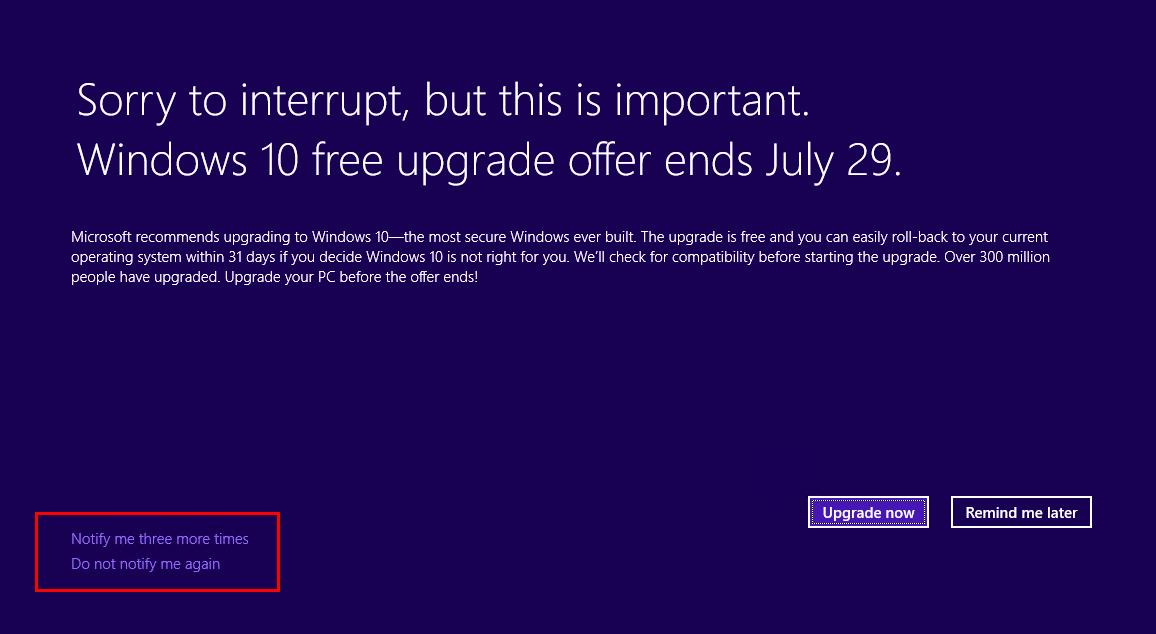
    Microsoft promised not to annoy users as it tries to get them to update to Windows 10. Even with this promise, the company is sending out reminders that take up the entire screen. This is probably helpful for those who might not be aware there is a free upgrade offer but can be annoying to those who do not want to upgrade.

    Microsoft is calling this the “Windows 8.1 and Windows 7 SP1 end of free upgrade notification” and you may have probably have seen it already and if not, you may be seeing it soon.
    Windows 10 free upgrade

    In a statement, Microsoft says, “This notification is a reminder that the Window 10 free upgrade offer ends on July 29, 2016. Microsoft recommends that you upgrade to Windows 10 before the offer expires. You can choose to upgrade directly from the notification, dismiss the notification permanently, or choose to be reminded later.”

    If you do not grab the free upgrade right now, you will have to pay the next time you want to upgrade, otherwise, you will be forced to buy a new laptop/PC running the OS.

    Read More: Microsoft Accidentally Reveals That Windows 10 Anniversary Update Will Be Available On August 2

    Microsoft windows 10
    Kaluka wanjala
    • Website
    • Facebook
    • X (Twitter)
    • LinkedIn

    Editor at TechArena. I cover all things technology and review new gadgets as I get them. You can reach me on email: [email protected]

    Related Posts

    Binance Launches ‘Binance Junior’ Crypto Savings Account for Kids and Teens 

    December 3, 2025

    Bolt and Gebeya Partner to Offer Affordable Transport to Africa’s Service Workforce

    December 3, 2025

    Safaricom Ethiopia Launches M-PESA LeHulum, a Telco-Agnostic Mobile Money Platform for All Ethiopians

    December 2, 2025

    Comments are closed.

    Latest Posts

    Government Lists Nine Conditions Vodacom Must Meet Before Buying Safaricom Stake

    December 8, 2025

    How is Technology Transforming Gold Trading?

    December 8, 2025

    Riyadh to Host Global AI Show 2026

    December 8, 2025

    Absa Bank Kenya Named Bank of the Year – Kenya at the 2025 Banker Awards

    December 8, 2025
    Advertisement
    Editor's Pick

    Government Lists Nine Conditions Vodacom Must Meet Before Buying Safaricom Stake

    December 8, 2025

    The Cybersecurity Battle Shaping Africa’s Entertainment Future

    December 8, 2025

    Sovereignty emerges as the defining cloud challenge for EMEA enterprises

    December 2, 2025

    [Op-Ed] Unlocking Peak Productivity: Three steps to unlocking the agentic enterprise future

    December 1, 2025
    © 2025 TechArena.. All rights reserved.
    • Home
    • Startups
    • Reviews

    Type above and press Enter to search. Press Esc to cancel.