


Close Menu

    Subscribe to Updates

    Get the latest tech news

    Facebook X (Twitter) Instagram
    TechArenaTechArena
    • Home
    • News
    • Reviews
    • Features
      • Top 5
    • Startups
    • Contact
    Facebook X (Twitter) Instagram
    TechArenaTechArena
    Home»Apps»You can now quote WhatsApp messages you want to respond to
    Apps

    You can now quote WhatsApp messages you want to respond to

    Kaluka wanjalaBy Kaluka wanjalaJune 13, 2016Updated:June 13, 20162 Mins Read
    Facebook Twitter Telegram LinkedIn WhatsApp Email Pinterest
    WhatsApp
    WhatsApp
    Share
    Facebook Twitter LinkedIn WhatsApp Telegram

    WhatsApp is making some changes on its platform to improve your experience when using its app. The company is introducing quoted messages that will allow you to reply to specific messages whether chatting to one person in a one on one conversation or in a group conversation. This feature will be very important in group settings as you will be able to reply to one person even if there are several messages from other group member. It makes it easier for the other parties in the group to know what you are replying to.

    This feature has been rolling out to the beta version of the app but some people with the current public version of WhatsApp for Android (version 2.16.95). Surprising enough, this feature doesn’t require an update as I have seen it on my version which is the one currently available on the Play Store. If you don’t have it on your device, you will have to wait a few more days to get it or you can just uninstall and reinstall the app.
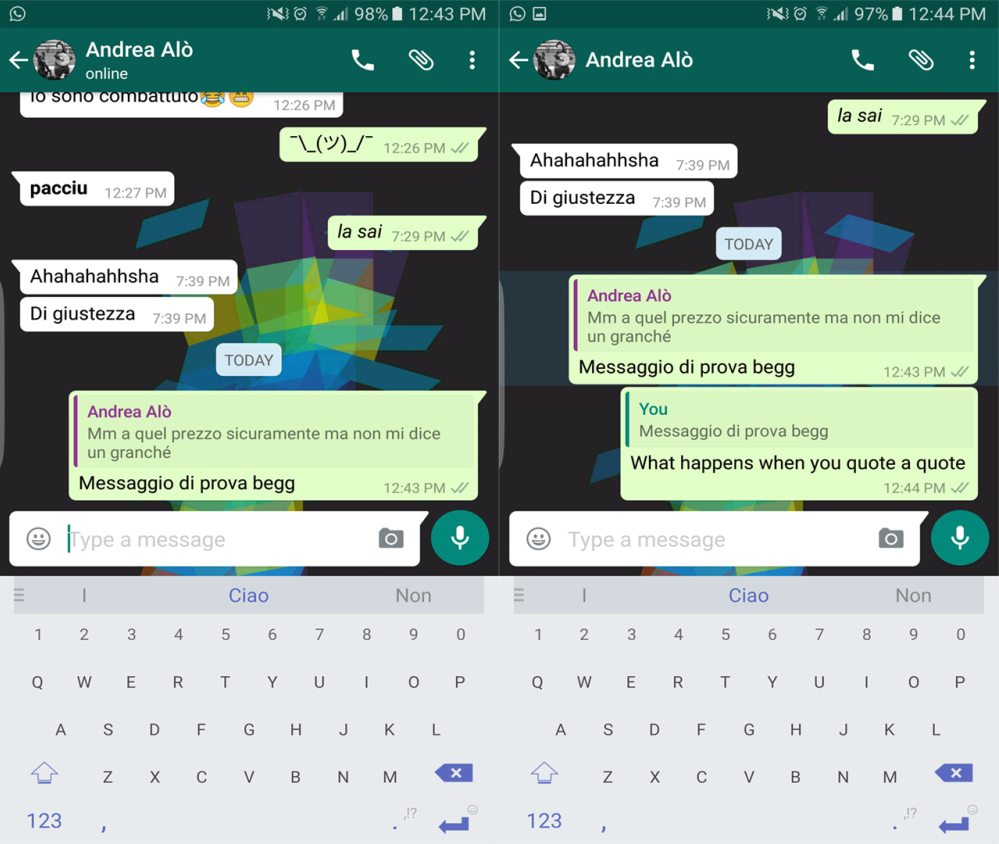
    WhatsApp quote replys

    To be able to quote a previously sent message in your reply, just long press on it till some message settings appear at the top section. Tap on the reply arrow and this will quote the message from where you can type what you want to accompany the quote. You can also quote your own messages if you want to reiterate the message you had sent earlier.

    At the moment, you can only quote a single message so you will have to do it over and over again if you want to quote multiple messages. This feature is also much more useful in group chats than it is in one on one conversations.

    For those who have used Telegram, you may have seen this feature over there and it seems like WhatsApp is just catching up. Telegram has always set the pace when it comes to instant messaging apps and even though WhatsApp is the most popular instant messaging app out there, Telegram has always been one step ahead.

    Read More: Telegram’s Latest Update Allows You to Edit Sent Messages

    Telegram whatsapp
    Kaluka wanjala
    • Website
    • Facebook
    • X (Twitter)
    • LinkedIn

    Editor at TechArena. I cover all things technology and review new gadgets as I get them. You can reach me on email: [email protected]

    Related Posts

    What You Need to Know About Ziidi Trader on M-PESA

    February 10, 2026

    TikTok for Business Is Reshaping How Kenyan Brands Do Digital Advertising

    February 3, 2026

    MYDAWA Stabilizes Platform After Major Upgrade

    December 18, 2025

    Comments are closed.

    Latest Posts

    Delta40 Raises $20 Million to Support Africa’s First Institutional Venture Studio + Fund Model

    February 11, 2026

    What You Need to Know About Ziidi Trader on M-PESA

    February 10, 2026

    Wimbart Launches “Wimbart Lite” to Support Africa’s Early-Stage Startups Raising Under $1M

    February 10, 2026

    NCBA Becomes First Bank in East & Central Africa to Achieve Dual ISO 27001 and 27701 Certifications

    February 9, 2026
    Advertisement
    Editor's Pick

    Deepfake Scams and AI-Generated Malware Are Now Top Cyber Risks for Kenya, ESET Warns

    February 5, 2026

    The Smartphone as an AI Platform: What On-Device AI Really Means for Africa

    February 4, 2026

    What You Need to Know About Kenya’s National Electric Mobility Policy (e-Mobility Policy)

    February 4, 2026

    How Data Centers Are Reshaping Africa’s Power Market

    February 2, 2026
    © 2026 TechArena.. All rights reserved.
    • Home
    • Startups
    • Reviews

    Type above and press Enter to search. Press Esc to cancel.