


Close Menu

    Subscribe to Updates

    Get the latest tech news

    Facebook X (Twitter) Instagram
    TechArenaTechArena
    • Home
    • News
    • Reviews
    • Features
      • Top 5
    • Startups
    • Contact
    Facebook X (Twitter) Instagram
    TechArenaTechArena
    Home»Apps»Android Marshmallow has started rolling out to the Infinix Hot 2
    Apps

    Android Marshmallow has started rolling out to the Infinix Hot 2

    Kaluka wanjalaBy Kaluka wanjalaJanuary 12, 2016Updated:August 14, 20252 Mins Read
    Facebook Twitter Telegram LinkedIn WhatsApp Email Pinterest

    Warning: Trying to access array offset on false in /home/igamobhi/techarena.co.ke/wp-content/themes/smart-mag/partials/single/featured.php on line 78
    Share
    Facebook Twitter LinkedIn WhatsApp Telegram

    The Infinix Hot 2 is the first Android One smartphone to be launched in Africa. It was launched sometime last year and most Android fans were happy to see it since it was the first Android One device this part of the world.

    For those who don’t know, Android One devices are made through a partnership between manufacturers and Google and tend to be affordable and usually have some decent (not the best but good) specifications. They usually are among the first devices to get the latest Android updates and tend to run stock Android or something close to that.

    The disappointing thing about the Infinix Hot 2 is that it did not get Android Marshmallow as fast as most people expected. This update started rolling out to other Android One devices back in October and we were left to wonder if the Hot 2 will ever get this update.

    Read More: Android 6.0 Marshmallow Is Already Rolling Out To Some Android One Device
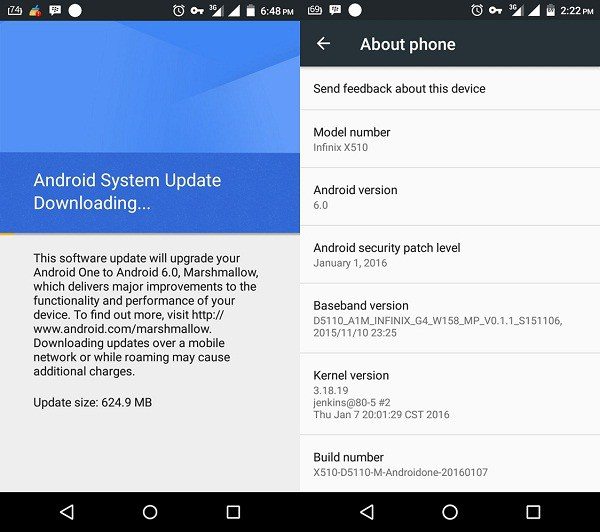
    Infinix Hote 2 Android Marshmallow
    Infinix Hote 2 Android Marshmallow

    For those who are using the Hot 2, the wait might be over as the Marshmallow (Android 6.0) update has started rolling out to this phone. The update has started rolling out in Nigeria and this means that we should be seeing it in Kenya anytime from today.

    To get the update, head over to the systems update tab in the setting page or the app drawer and click on ‘Check for updates’ tab (Menu/app drawer > System update > Check for updates). This is an Over The Air (OTA) update so you will probably get notified when it is available for you. I would not recommend downloading Android Marshmallow and updating your Hot 2 manually unless you know exactly what you are doing.

    Source

    hot 2 infinix infinix hot 2
    Kaluka wanjala
    • Website
    • Facebook
    • X (Twitter)
    • LinkedIn

    Editor at TechArena. I cover all things technology and review new gadgets as I get them. You can reach me on email: [email protected]

    Related Posts

    What You Need to Know About Ziidi Trader on M-PESA

    February 10, 2026

    LG Electronics Showcases “Affectionate Intelligence” at CES 2026

    February 4, 2026

    Infinix Note Edge Launched in Kenya with Dimensity 7100, Android 16 & Self-Healing Battery

    February 3, 2026

    Comments are closed.

    Latest Posts

    Agridex and Tradeflow Partner to Channel Institutional Capital into Kenya’s SME and Agriculture Trade

    February 12, 2026

    KCB and Visa Roll Out Business Credit Card for Kenyan SMEs

    February 12, 2026

    Konza Technopolis Joins Global ‘7 Wonders of Future Cities’ Initiative

    February 12, 2026

    LG Introduces Locally Adaptive AI Smart Home Solutions for Africa at InnoFest 2026 MEA

    February 12, 2026
    Advertisement
    Editor's Pick

    Deepfake Scams and AI-Generated Malware Are Now Top Cyber Risks for Kenya, ESET Warns

    February 5, 2026

    The Smartphone as an AI Platform: What On-Device AI Really Means for Africa

    February 4, 2026

    What You Need to Know About Kenya’s National Electric Mobility Policy (e-Mobility Policy)

    February 4, 2026

    How Data Centers Are Reshaping Africa’s Power Market

    February 2, 2026
    © 2026 TechArena.. All rights reserved.
    • Home
    • Startups
    • Reviews

    Type above and press Enter to search. Press Esc to cancel.