


Close Menu

    Subscribe to Updates

    Get the latest tech news

    Facebook X (Twitter) Instagram
    TechArenaTechArena
    • Home
    • News
    • Reviews
    • Features
      • Top 5
    • Startups
    • Contact
    Facebook X (Twitter) Instagram
    TechArenaTechArena
    Home»Apps»You Can Now Send HD photos on WhatsApp
    Apps

    You Can Now Send HD photos on WhatsApp

    Kaluka wanjalaBy Kaluka wanjalaAugust 21, 20232 Mins Read
    Facebook Twitter Telegram LinkedIn WhatsApp Email Pinterest
    WhatsApp HD quality photos
    WhatsApp HD quality photos
    Share
    Facebook Twitter LinkedIn WhatsApp Telegram

    WhatsApp is a very popular messaging app but one thing it has always lacked is the ability to share high quality photos. Most times, when you send an image to your contacts, it is compressed and never looks good. Even if you select the option to share high quality images, the compression applied affects the quality significantly. I normally use Telegram if I have to send photos as the recipient gets high quality photos compared to WhatsApp.

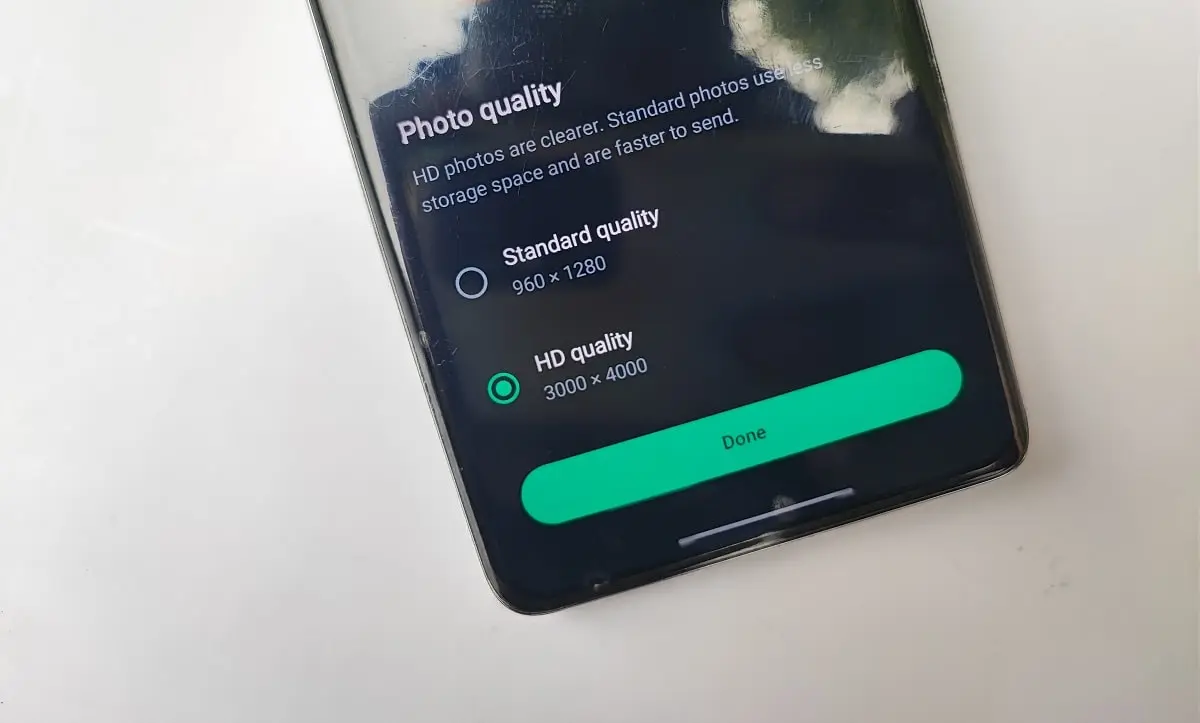
    WhatsApp is finally changing this and it’s now possible to send HD quality photos through the app. This was recently revealed by Mark Zuckerberg, CEO of Meta, the company that owns WhatsApp. He shared this on Facebook with the caption, “Sharing photos on WhatsApp just got an upgrade — now you can send in HD.” At the moment, you can only share high-quality images not videos.

    This feature will roll out to users globally over the next few weeks. I do assume there is still some form of compression but it is not as aggressive as it was before. If someone sends you a high quality photo, you will see a small icon indicating that. 

    How to Send High-quality photos on WhatsApp

    Sending HD photos on WhatsApp is easy and straightforward. 

    • Open the chat you want to send the HD photo to.
    • Navigate to the share button as you have done when sharing photos and videos.
    • Select the photo you want to share.
    • At the top left side of the photo next to the crop button you will see the ‘HD’ icon.
    • Tap on the HD icon and you will be able to select either ‘standard quality’ or ‘HD quality’. 
    • Send the photo.

    Also Read: WhatsApp Beta Testers Can Now Add Multiple Accounts to One App

    whatsapp WhatsApp for Android WhatsApp for iOS
    Kaluka wanjala
    • Website
    • Facebook
    • X (Twitter)
    • LinkedIn

    Editor at TechArena. I cover all things technology and review new gadgets as I get them. You can reach me on email: [email protected]

    Related Posts

    Neeraj Pradhan appointed as CEO of Liquid Intelligent Technologies Kenya

    December 12, 2025

    Airtel Money Partners With I&M Bank To Expand Digital Payments Reach Across Kenya

    December 11, 2025

    Fincra Named Headline Supporter for Africa Tech Summit Nairobi 2026

    December 11, 2025

    Comments are closed.

    Latest Posts

    Neeraj Pradhan appointed as CEO of Liquid Intelligent Technologies Kenya

    December 12, 2025

    Inside Ampersand the Startup Powering East Africa’s Electric Motorcycles

    December 11, 2025

    Visa Showcases 22 Startups at Africa Fintech Accelerator Demo Day in Cape Town

    December 11, 2025

    Airtel Money Partners With I&M Bank To Expand Digital Payments Reach Across Kenya

    December 11, 2025
    Advertisement
    Editor's Pick

    Inside Ampersand the Startup Powering East Africa’s Electric Motorcycles

    December 11, 2025

    What You Need to Know About KCB and Visa’s New Tap to Phone Payment Solution in Kenya

    December 11, 2025

    Accelerated entry: How East Africa Leapfrogged into the Cloud Age

    December 11, 2025

    How Buying Data on M-PESA Opened New Doors for Sheila

    December 10, 2025
    © 2025 TechArena.. All rights reserved.
    • Home
    • Startups
    • Reviews

    Type above and press Enter to search. Press Esc to cancel.