


Close Menu

    Subscribe to Updates

    Get the latest tech news

    Facebook X (Twitter) Instagram
    TechArenaTechArena
    • Home
    • News
    • Reviews
    • Features
      • Top 5
    • Startups
    • Contact
    Facebook X (Twitter) Instagram
    TechArenaTechArena
    Home»Features»How to Transfer WhatsApp Chats from iOS to Android (Samsung devices)
    Features

    How to Transfer WhatsApp Chats from iOS to Android (Samsung devices)

    Kaluka wanjalaBy Kaluka wanjalaSeptember 6, 2021Updated:November 21, 20212 Mins Read
    Facebook Twitter Telegram LinkedIn WhatsApp Email Pinterest
    WhatsApp chats
    WhatsApp chats
    Share
    Facebook Twitter LinkedIn WhatsApp Telegram

    When Samsung unveiled its latest smartphones last month, the Galaxy Z Fold3 and Z Flip3, last month, WhatsApp also revealed that it had plans to support moving chat history from iOS to Samsung devices powered by Android 10 or 11. This support is long overdue for the platform that does not seem to innovate fast enough.

    This feature is now live and can be done easily if you want to move your chats from an iOS device to your Samsung device that is running Android 10 or 11.

    According to WhatsApp, the entire process happens without your messages being sent to WhatsApp and this means that they cannot see your data. “Transferred data doesn’t go to cloud storage as a result of the migration (though you may have sent this data to your cloud storage separately via Chat Backup),” WhatsApp said in a statement.

    You will need a USB-C to Lightning cable for this to work. Account information, your profile photo, individual chats, group chats, chat history, media and settings are all transferred over. Call history and your display name will not be transferred through this process.

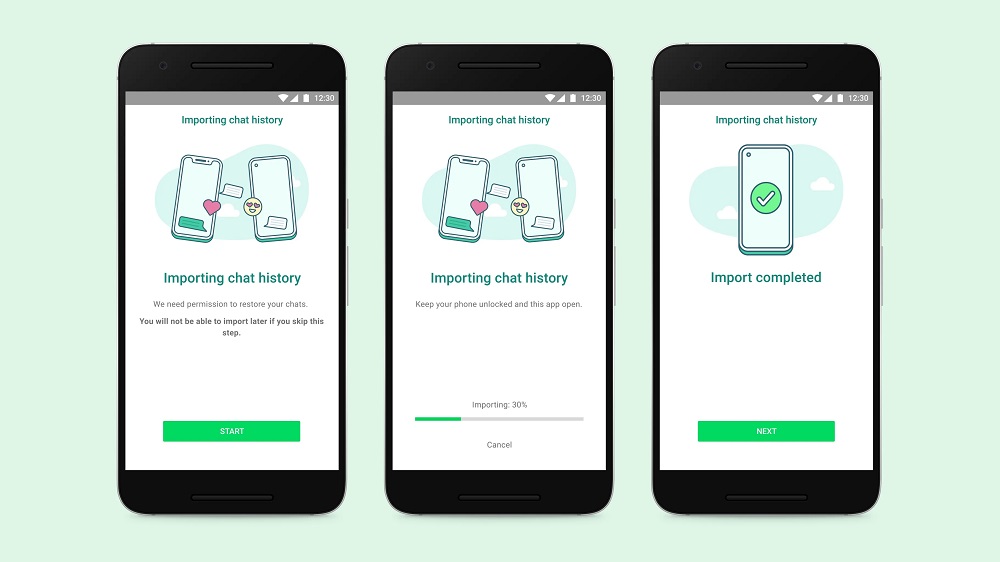
    How to transfer WhatsApp Chats from iPhone to Samsung

    • Turn on your Samsung and connect by cable to your iPhone when prompted.
    • Follow the Samsung Smart Switch experience.
    • When prompted, scan the QR code displayed on the new device using the iPhone’s camera.
    • Tap Start on your iPhone, and wait for the process to complete.
    • Continue setting up your new Samsung.
    • When you reach the home screen, open WhatsApp and log in using the same phone number used on your old device.
    • Tap Import when prompted, and allow the process to complete.
    • Finish activating your new device and you’ll see your chats waiting for you.

    Read: WhatsApp Might Let iOS Users Easily Move Chats to Android

    source

    android Samsung whatsapp
    Kaluka wanjala
    • Website
    • Facebook
    • X (Twitter)
    • LinkedIn

    Editor at TechArena. I cover all things technology and review new gadgets as I get them. You can reach me on email: [email protected]

    Related Posts

    TechArena to Break New Documentary Series Telling Africa’s Blockchain and AI Story From Nairobi

    December 18, 2025

    [Op-Ed] How Safaricom Is Helping Enterprises Build Cyber Resilience

    December 17, 2025

    [Op-Ed] From Generative to Agentic: How Kenya’s AI Future Will Be Built on Trust, Data and Practical Automation

    December 16, 2025

    Comments are closed.

    Latest Posts

    250 Youth in Dagoretti North Graduate from Huawei’s DigiTruck Digital Skills Programme

    December 19, 2025

    UAE’s $1B AI for Development Fund Opens Door for Kenya’s National AI Strategy

    December 19, 2025

    Qualcomm Announces Successful Completion of Make in Africa Startup Mentorship Program 2025

    December 19, 2025

    Rwanda-Based Fintech Kayko Raises $1.2 Million Seed Round

    December 19, 2025
    Advertisement
    Editor's Pick

    TechArena to Break New Documentary Series Telling Africa’s Blockchain and AI Story From Nairobi

    December 18, 2025

    [Op-Ed] How Safaricom Is Helping Enterprises Build Cyber Resilience

    December 17, 2025

    [Op-Ed] From Generative to Agentic: How Kenya’s AI Future Will Be Built on Trust, Data and Practical Automation

    December 16, 2025

    Inside Ampersand the Startup Powering East Africa’s Electric Motorcycles

    December 11, 2025
    © 2025 TechArena.. All rights reserved.
    • Home
    • Startups
    • Reviews

    Type above and press Enter to search. Press Esc to cancel.