


Close Menu

    Subscribe to Updates

    Get the latest tech news

    Facebook X (Twitter) Instagram
    TechArenaTechArena
    • Home
    • News
    • Reviews
    • Features
      • Top 5
    • Startups
    • Contact
    Facebook X (Twitter) Instagram
    TechArenaTechArena
    Home»Apps»Microsoft Revamps Windows 10 Task Bar With News and Weather Updates
    Apps

    Microsoft Revamps Windows 10 Task Bar With News and Weather Updates

    Alvin WanjalaBy Alvin WanjalaApril 23, 20212 Mins Read
    Facebook Twitter Telegram LinkedIn WhatsApp Email Pinterest
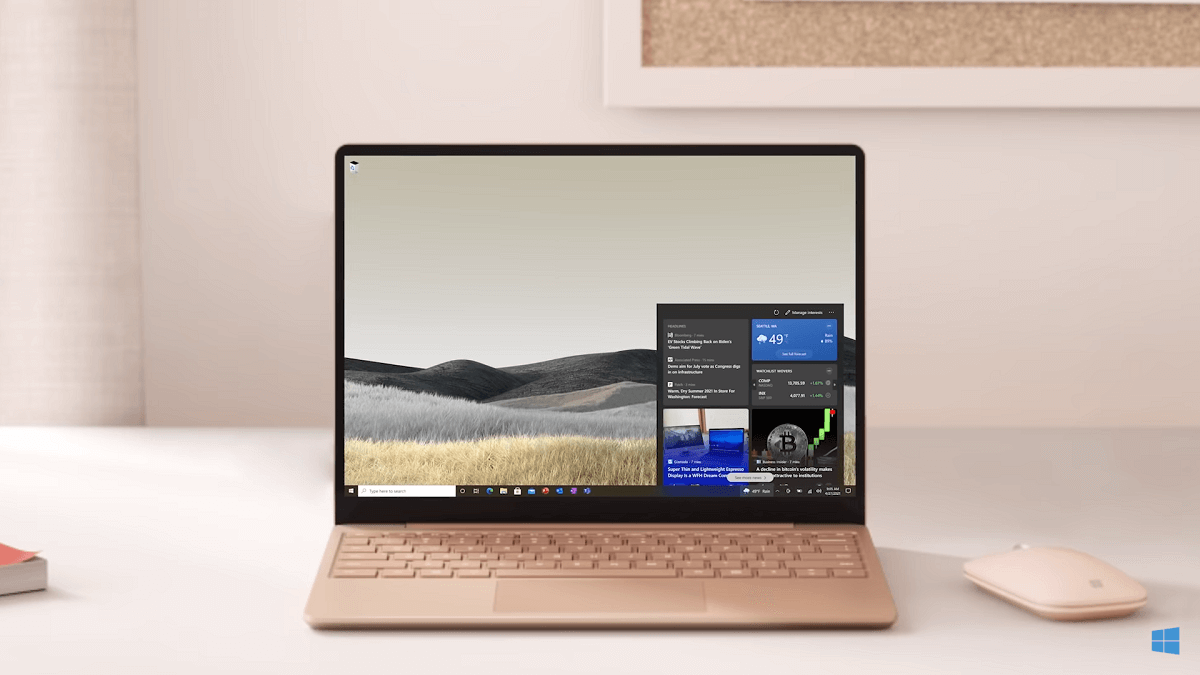
    Windows 10 revamped task bar
    Windows 10 revamped task bar
    Share
    Facebook Twitter LinkedIn WhatsApp Telegram

    If you like keeping up with the latest updates in the world of sports, technology, crypto … you name it, it can be hard to do so. Microsoft’s latest update to the Windows 10 taskbar wants to streamline this process by providing you with a simple and easy way to stay current.

    The latest Windows 10 update has revamped the taskbar, including news and weather updates making them more accessible. The revamp was rolled out to the Windows Insider preview channel in January. After months of testing, the company seems content with the test results and is ready to let every PC user use the new Task Bar.

    Basically, you’ll be able to see news and weather updates a click away. The first change is the addition of a weather icon on the taskbar that shows the current conditions without clicking anything. Additional weather details emerge when you hover over the icon shown in a new hideous card. The information card will also show news, sports, stocks, and traffic updates.

    Tapping on a news story will open it in an ingenious way that offers a “streamlined reading experience.”

    You can personalize what shows in the news section by manually selecting your interests. Microsoft will also let you choose your preferred publications to refine your information cards further.

    And the company knows not everyone loves staying current, so you have an option to off the information card completely.

    News and interests on the Windows taskbar have begun rolling out, but it might take some time before you see it on your end. Some will see the new feature in the coming weeks, while others might have to wait a bit longer.

    The “phased and measured approach” should see everyone covered after a few months.

    Read Next: University Students need continuous mentorship to become relevant in their chosen fields of study

    windows 10
    Alvin Wanjala
    • Facebook
    • X (Twitter)
    • Instagram

    Alvin Wanjala has been writing about technology for over 2 years(and counting). He writes about different topics in the consumer tech space. He loves streaming music, programming, and gaming during downtimes.

    Related Posts

    250 Youth in Dagoretti North Graduate from Huawei’s DigiTruck Digital Skills Programme

    December 19, 2025

    UAE’s $1B AI for Development Fund Opens Door for Kenya’s National AI Strategy

    December 19, 2025

    Qualcomm Announces Successful Completion of Make in Africa Startup Mentorship Program 2025

    December 19, 2025

    Comments are closed.

    Latest Posts

    When Should Startups Start Automating Tests?

    December 23, 2025

    Ethereum Price: A Comprehensive Guide to Understanding Its Value

    December 23, 2025

    How Casino Bonuses Define Your Experience in Online Casinos

    December 22, 2025

    250 Youth in Dagoretti North Graduate from Huawei’s DigiTruck Digital Skills Programme

    December 19, 2025
    Advertisement
    Editor's Pick

    TechArena to Break New Documentary Series Telling Africa’s Blockchain and AI Story From Nairobi

    December 18, 2025

    [Op-Ed] How Safaricom Is Helping Enterprises Build Cyber Resilience

    December 17, 2025

    [Op-Ed] From Generative to Agentic: How Kenya’s AI Future Will Be Built on Trust, Data and Practical Automation

    December 16, 2025

    Inside Ampersand the Startup Powering East Africa’s Electric Motorcycles

    December 11, 2025
    © 2025 TechArena.. All rights reserved.
    • Home
    • Startups
    • Reviews

    Type above and press Enter to search. Press Esc to cancel.