



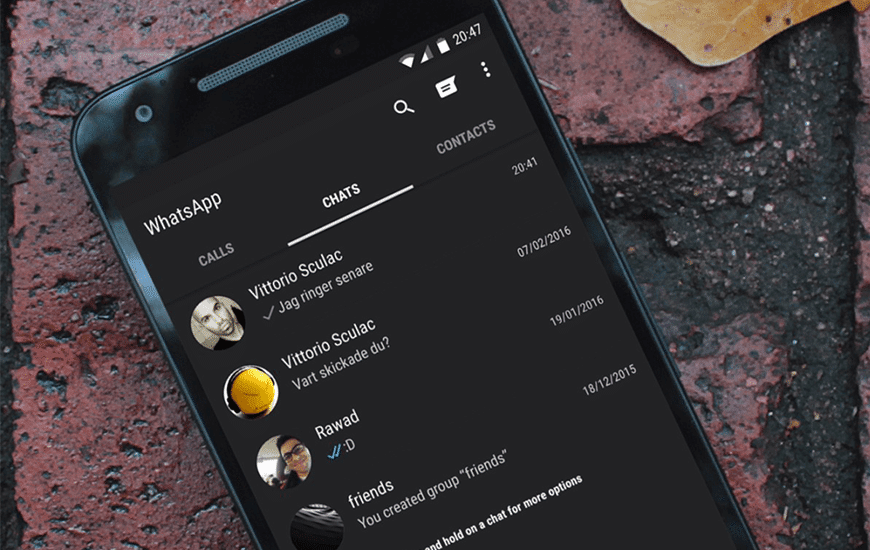
A number of Android users have even been able to get an early glimpse of what Whatsapp dark mode will look like by exploiting a small bug in the current beta release. So what is it, why does it matter, and when will it roll out?
Here is what we know so far.
WhatsApp dark mode is a new design which will replace/swap its current palette of light grey and green for shades of black, teal and midnight blue. Whatsapp dark mode does not totally replace the current look but will be available to choose if you one wishes to.
Many users find dark backgrounds easier to look at for long periods of time, as there’s less glare than you get with a light coloured interface. Darker screens also use less power and these are few of the many reasons why you might want to try Whatsapp dark mode out.
If you have a phone running Android 10 and are part of the beta program, then you might get a glimpse of the dark mode. There is no option to activate it on the settings but you can try and activate it by doing the following.
- Ensure your phone is set to the dark mode
- Download the latest version of WhatsApp Beta.
- Open the YouTube app, select a video, tap ‘Share’ and copy the URL
- Open WhatsApp Beta and select a contact or a group chat
- Paste the video URL as a new message
- With the keyboard still open, tap the video thumbnail to start the YouTube player
Well, this might work or not work, so there is no surety about it but if it does work, WhatsApp will switch to dark mode when the YouTube picture-in-picture player is started. The beta program for iOS is currently full, but it could re-open at any time.
WhatsApp dark mode will activate automatically when you switch on your phone’s power-saving mode or can be activated by the user in the settings.
One thing I couldn’t have afforded to forget is that based on recently leaked screenshots, it looks like you’ll be able to set messages to be erased after a period between five minutes and an hour.
This will be a long-overdue addition to Whatsapp as rival messaging apps like Facebook Messenger, Telegram and Signal already offer a similar feature.
