


Close Menu

    Subscribe to Updates

    Get the latest tech news

    Facebook X (Twitter) Instagram
    TechArenaTechArena
    • Home
    • News
    • Reviews
    • Features
      • Top 5
    • Startups
    • Contact
    Facebook X (Twitter) Instagram
    TechArenaTechArena
    Home»Apps»Facebook’s New Facial Recognition Feature Now Off by Default
    Apps

    Facebook’s New Facial Recognition Feature Now Off by Default

    Alvin WanjalaBy Alvin WanjalaSeptember 4, 20192 Mins Read
    Facebook Twitter Telegram LinkedIn WhatsApp Email Pinterest
    Share
    Facebook Twitter LinkedIn WhatsApp Telegram

    Facebook’s facial recognition feature dubbed “tag suggestions” was introduced about two years ago. Since then, the functionality has been turned on by default at all times – sadly, the company never provided a way to opt-out.

    However, since the $5bn fine by the FCC, the company has been slowly making changes to adapt the never-ending privacy criticism to stay off the radar. The company has announced this week that it is yanking out its tag suggestions feature.

    However, facial recognition on the platform is not a feature of the past, yet. The company is removing tag suggestions, and in its place, an overall facial recognition feature will be rolled out, but this time, it will be turned off by default.

    Facebook said the feature is already rolling out on the platform, and users will be notified when it arrives on their end. With the notification, users will be offered a way to turn the feature on.

    But if you don’t act on the message, facial recognition will remain switched off.
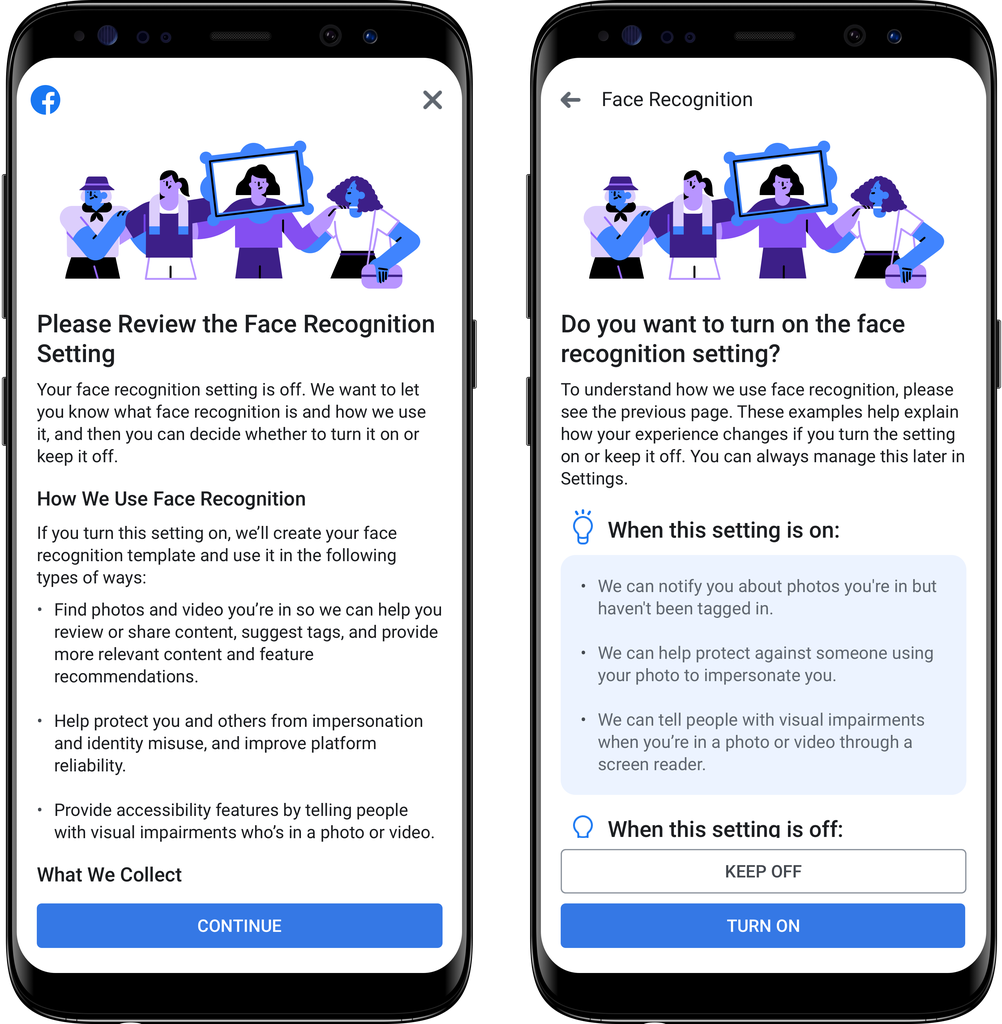
    Facebook’s Face Recognition message

    “If you do not currently have the face recognition setting and do nothing, we will not use face recognition to recognize you or suggest tags,” said Facebook in a blog post.

    “In addition, features like Photo Review, which lets you know when you appear in photos even if you are not tagged, as long as you have permission to see the post based on its privacy setting, will not be activated,” the statement continued.

    For new users, the feature will also be turned off by default.

    On matters of privacy…

    Facebook’s Srinivas Narayanan, Lead of Applied Research in Facebook AI says they have continued to “engage with privacy experts, academics, regulators and people on Facebook about how we use face recognition and the options you have to control it.

    Additionally, Srinivas says “Facebook’s face recognition technology still does not recognize you to strangers. We don’t share your face recognition information with third parties. We also don’t sell our technology.”

    facebook
    Alvin Wanjala
    • Facebook
    • X (Twitter)
    • Instagram

    Alvin Wanjala has been writing about technology for over 2 years(and counting). He writes about different topics in the consumer tech space. He loves streaming music, programming, and gaming during downtimes.

    Related Posts

    i3 Announces New Healthtech Partnerships to Accelerate Access to Care Across Africa

    December 10, 2025

    Ezeebit Raises $2.05 Million to Scale Stablecoin Payments Across Africa

    December 10, 2025

    Dan Kwach Exits Africa Data Centres After 19 Years

    December 9, 2025

    Comments are closed.

    Latest Posts

    Play at CaptainsBet: One Site, Many Adventures

    December 10, 2025

    What Does Captains Bet Kenya Do Right?

    December 10, 2025

    i3 Announces New Healthtech Partnerships to Accelerate Access to Care Across Africa

    December 10, 2025

    How Buying Data on M-PESA Opened New Doors for Sheila

    December 10, 2025
    Advertisement
    Editor's Pick

    How Buying Data on M-PESA Opened New Doors for Sheila

    December 10, 2025

    Why endpoint security still anchors cyber resilience in Africa

    December 9, 2025

    Government Lists Nine Conditions Vodacom Must Meet Before Buying Safaricom Stake

    December 8, 2025

    The Cybersecurity Battle Shaping Africa’s Entertainment Future

    December 8, 2025
    © 2025 TechArena.. All rights reserved.
    • Home
    • Startups
    • Reviews

    Type above and press Enter to search. Press Esc to cancel.