


Close Menu

    Subscribe to Updates

    Get the latest tech news

    Facebook X (Twitter) Instagram
    TechArenaTechArena
    • Home
    • News
    • Reviews
    • Features
      • Top 5
    • Events
    • Startups
    • Contact
    Facebook X (Twitter) Instagram
    TechArenaTechArena
    Home»News»Google Is Waging War On Websites Fake Download Buttons
    News

    Google Is Waging War On Websites Fake Download Buttons

    Kaluka wanjalaBy Kaluka wanjalaFebruary 5, 20162 Mins Read
    Facebook Twitter Telegram LinkedIn WhatsApp Email Pinterest
    Google war on deceptive ads
    Google war on deceptive ads
    Share
    Facebook Twitter LinkedIn WhatsApp Telegram

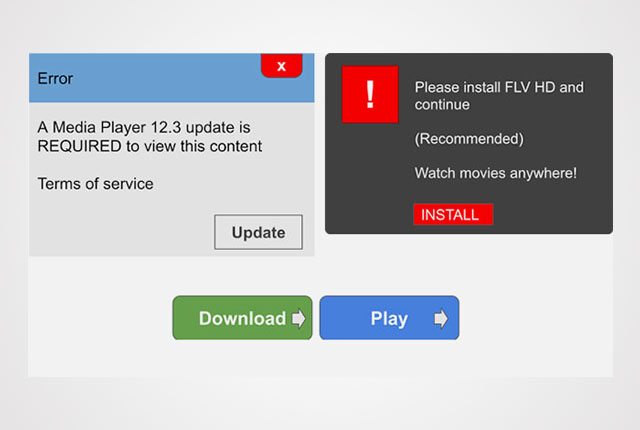
    If you spend most of your time on the internet, you may have come across websites with fake “download” and “play” buttons. These can be very annoying to the user who may feel like his/her time was wasted by the whole process. Most of these websites use the fake buttons to deceive users to click on advertisements.
    Google has announced that it will be cracking down on websites that have fake “download” and “play” buttons that are used to deceive users. In a blog post, the company said, “In November, we announced that Safe Browsing would protect you from social engineering attacks – deceptive tactics that try to trick you into doing something dangerous, like installing unwanted software or revealing your personal information (for example, passwords, phone numbers, or credit cards).”

    The company went ahead to say, “You may have encountered social engineering in a deceptive download button, or an image ad that falsely claims your system is out of date. Today, we’re expanding Safe Browsing protection to protect you from such deceptive embedded content, like social engineering ads.”

    This is a very positive move by Google as some of these websites have been very annoying and intrusive to say the least.

    According to Google, a web page will be considered social engineering when it:

    • Pretend to act, or look and feel, like a trusted entity — like your own device or browser, or the website itself.
    • Try to trick you into doing something you’d only do for a trusted entity — like sharing a password or calling tech support.

    Read More: No Need for A Google+ Account to Sign in to Google Play

    Google
    Kaluka wanjala
    • Website
    • Facebook
    • X (Twitter)
    • LinkedIn

    Editor at TechArena. I cover all things technology and review new gadgets as I get them. You can reach me on email: [email protected]

    Related Posts

    Tecno AI Identified as Catalyst for Africa’s Digital Economy in New Omdia Report 

    May 15, 2026

    Kenya Is Not Catching Up, It is Building the Future of Finance, Says NIFC CEO

    May 15, 2026

    Red Hat Introduces New Sovereign and Private Cloud Capabilities to Power Digital Autonomy

    May 15, 2026

    Comments are closed.

    Latest Posts

    Tecno AI Identified as Catalyst for Africa’s Digital Economy in New Omdia Report 

    May 15, 2026

    oraimo Launches SpaceBuds 2: AI-Powered Flagship Earbuds Endorsed by Grammy Award-Winning Excellence

    May 15, 2026

    Kenya Is Not Catching Up, It is Building the Future of Finance, Says NIFC CEO

    May 15, 2026

    Why Safaricom Thinks Local Cloud Infrastructure Can Beat AWS and Azure in Kenya

    May 15, 2026
    Advertisement
    Editor's Pick

    Kenya Is Not Catching Up, It is Building the Future of Finance, Says NIFC CEO

    May 15, 2026

    Why Safaricom Thinks Local Cloud Infrastructure Can Beat AWS and Azure in Kenya

    May 15, 2026

    How 58% free transactions have propelled the growth of M-PESA

    May 15, 2026

    What comes after Generative AI? And What That Means for African Innovation

    May 13, 2026
    © 2026 TechArena.. All rights reserved.
    • Home
    • Startups
    • Reviews

    Type above and press Enter to search. Press Esc to cancel.