


Close Menu

    Subscribe to Updates

    Get the latest tech news

    Facebook X (Twitter) Instagram
    TechArenaTechArena
    • Home
    • News
    • Reviews
    • Features
      • Top 5
    • Startups
    • Contact
    Facebook X (Twitter) Instagram
    TechArenaTechArena
    Home»Features»How to Claim Your Spot in Google Search with People Cards
    Features

    How to Claim Your Spot in Google Search with People Cards

    Alvin WanjalaBy Alvin WanjalaDecember 8, 20202 Mins Read
    Facebook Twitter Telegram LinkedIn WhatsApp Email Pinterest
    google people cards
    google people cards
    Share
    Facebook Twitter LinkedIn WhatsApp Telegram

    Famous people are pretty easy to find on Google Search due to the vast amounts of information about them online. Most importantly, popular people have knowledge panels on Google Search, which includes the most important information about them and links to their personal websites and social media profiles, if any.

    But for the common folk, like you and me, it can get messy. Even searching for your own name online doesn’t reveal the most accurate results. Google is, however solving this with a new feature called People cards.

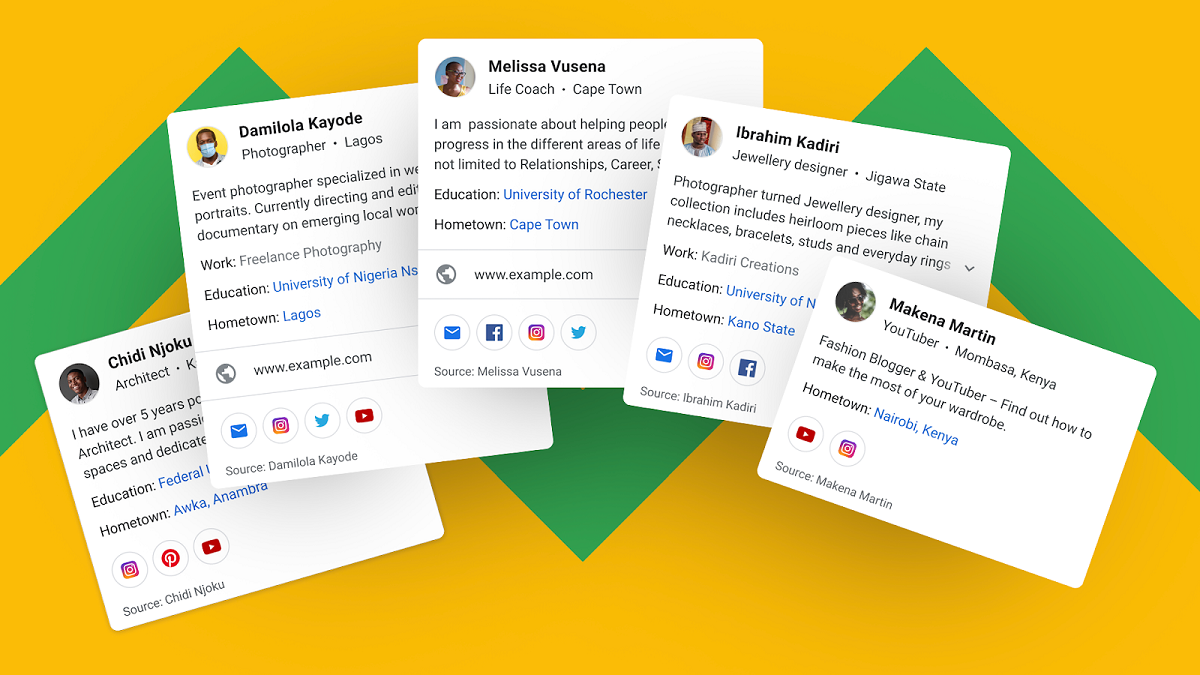
    People Cards acts like a virtual card that allows anyone – from content creators, business professionals, influencers, entrepreneurs, prospective employees, self-employed individuals, freelancers– to build an online presence.

    You can highlight the information you wish others to know about you, provide links to your personal website and social media profiles.

    Pre-requisites: A personal Google Account with Web & App activity turned on and a smartphone (The feature is not yet supported on desktop).

    How to Create a Personal People Card on Google

    Step 1. Sign in to your Google Account

    Step 2. Search for your name or “add me to Search” using your mobile phone

    Step 3. Select “Get Started”

    Step 4. Fill out the required information like Name, location, About, and Occupation. You can also provide additional details like education, hometown, website, social profiles, email, phone number (these are optional).

    Step 5. Click the “Preview” button to see how your card will look in Search.

    Step 6. Satisfied with the result? Click Save to finish the process. Tap View Card to view how your card looks like.

    That’s how you can add your profile on Google Search. If you wish to delete your card, you can freely do so.

    And in case you share a similar name with someone, Google Search will show multiple cards, so it’s easier to distinguish who’s who.

    Note:

    • This feature is only available in few countries worldwide including Kenya, Nigeria, South Africa and India.
    • Google has several measures in place to ensure the feature isn’t abused. For example, only one people card is allowed per Google Account, and a phone number is required to authenticate the account.

    Read Next: How to Pay for Your Zuku Subscription

    Google Google search People Cards
    Alvin Wanjala
    • Facebook
    • X (Twitter)
    • Instagram

    Alvin Wanjala has been writing about technology for over 2 years(and counting). He writes about different topics in the consumer tech space. He loves streaming music, programming, and gaming during downtimes.

    Related Posts

    Deepfake Scams and AI-Generated Malware Are Now Top Cyber Risks for Kenya, ESET Warns

    February 5, 2026

    The Smartphone as an AI Platform: What On-Device AI Really Means for Africa

    February 4, 2026

    What You Need to Know About Kenya’s National Electric Mobility Policy (e-Mobility Policy)

    February 4, 2026

    Comments are closed.

    Latest Posts

    Absa, Microsoft and Women in Tech Expand ElevateHer AI Programme Across Nine African Markets

    February 6, 2026

    LG Positions Africa as Key Growth Frontier for AI-Powered Smart Home Expansion at InnoFest 2026 MEA

    February 6, 2026

    Cellulant Appoints Michael Muriuki as Chief Product & Technology Officer

    February 6, 2026

    Pin Up how to play and win instructions for experienced players

    February 6, 2026
    Advertisement
    Editor's Pick

    Deepfake Scams and AI-Generated Malware Are Now Top Cyber Risks for Kenya, ESET Warns

    February 5, 2026

    The Smartphone as an AI Platform: What On-Device AI Really Means for Africa

    February 4, 2026

    What You Need to Know About Kenya’s National Electric Mobility Policy (e-Mobility Policy)

    February 4, 2026

    How Data Centers Are Reshaping Africa’s Power Market

    February 2, 2026
    © 2026 TechArena.. All rights reserved.
    • Home
    • Startups
    • Reviews

    Type above and press Enter to search. Press Esc to cancel.