


Close Menu

    Subscribe to Updates

    Get the latest tech news

    Facebook X (Twitter) Instagram
    TechArenaTechArena
    • Home
    • News
    • Reviews
    • Features
      • Top 5
    • Startups
    • Contact
    Facebook X (Twitter) Instagram
    TechArenaTechArena
    Home»Apps»WhatsApp Business Adds New Features as it Hits 50 Million Monthly Active Users
    Apps

    WhatsApp Business Adds New Features as it Hits 50 Million Monthly Active Users

    Alvin WanjalaBy Alvin WanjalaJuly 10, 20202 Mins Read
    Facebook Twitter Telegram LinkedIn WhatsApp Email Pinterest
    whatsapp business qr codes
    whatsapp business qr codes
    Share
    Facebook Twitter LinkedIn WhatsApp Telegram

    WhatsApp for Business has been out since 2018 and recently just announced a significant milestone. The platform’s parent company, Facebook, just revealed that WhatsApp Business now has 50 million active users.

    Along with the 50 million active monthly users’(MAUs) milestone, WhatsApp Business catalogs now draws 40million views per month. India is WhatsApp Business’s largest market, with over 15 million MAUs followed by Brazil at over 5 million MAUs.

    To celebrate the milestone, Facebook is rolling out new features on the business-focused version of its instant messaging platform to help businesses grow.

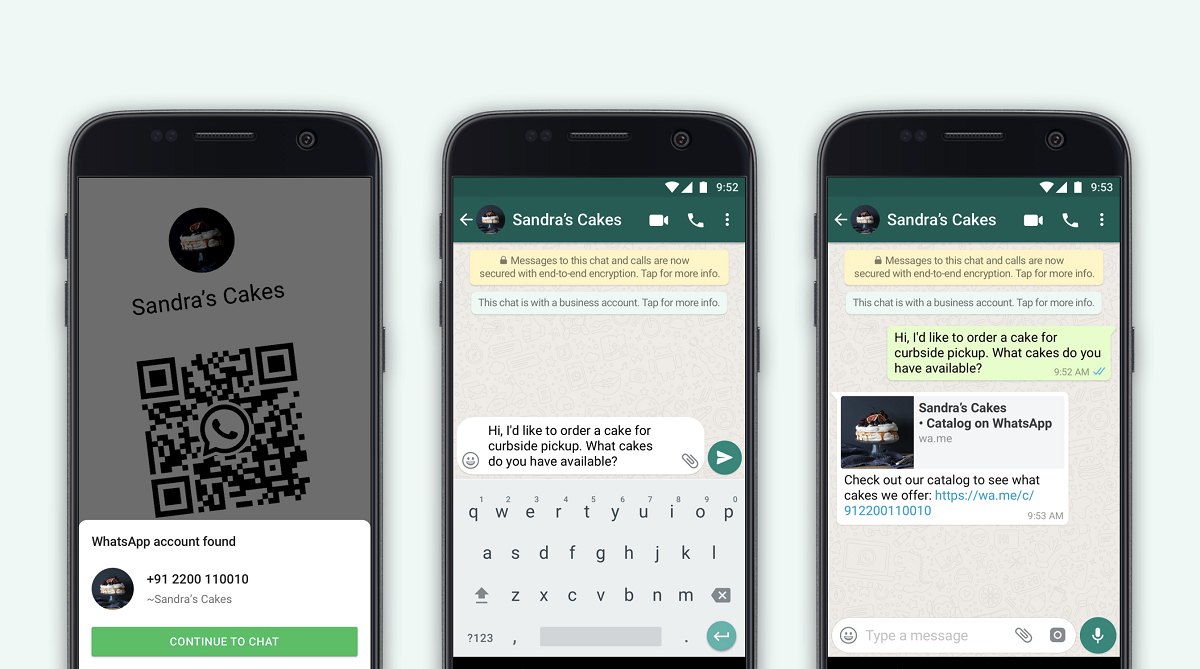
    One of them is the QR Code feature, which was added to the regular WhatsApp app recently. Instead of having to enter the business number manually to have a chat with them on WhatsApp, businesses will now display a QR code that you can scan and chat with them directly. Businesses can also make more use of the feature by using it to label packages and product tags.

    For customers, scanning a QR code will open a chat with an optional pre-populated message created by the business to start the conversation.

    Next up, WhatsApp business is adding a catalog sharing feature. The feature adds more functionality to the existing catalog support by making it easy to share catalogs and individual items as links on websites, Facebook, Instagram, and any other place online. Remember, catalogs can include products or services, or both.

    WhatsApp Business has also been added with stickers to show status. These include “we’re open for business,” “sorry, closed,” “out of stock,” and more.
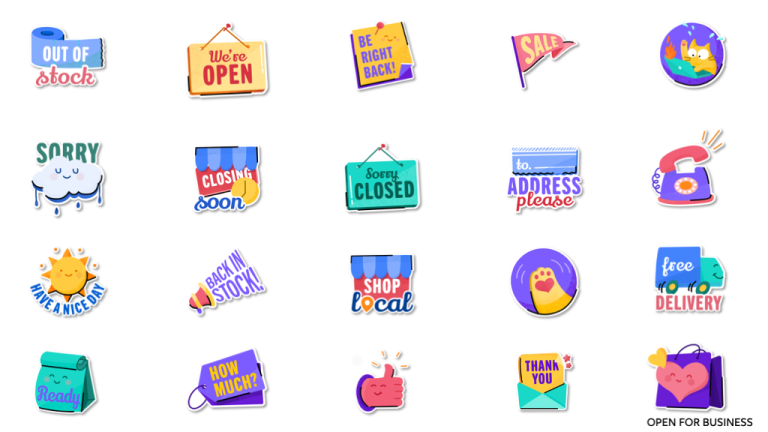
    New stickers on WhatsApp Business
    WhatsApp Update Lets Users Add New Contacts Using QR Codes
    whatsapp Whatsapp Business
    Alvin Wanjala
    • Facebook
    • X (Twitter)
    • Instagram

    Alvin Wanjala has been writing about technology for over 2 years(and counting). He writes about different topics in the consumer tech space. He loves streaming music, programming, and gaming during downtimes.

    Related Posts

    Absa, Microsoft and Women in Tech Expand ElevateHer AI Programme Across Nine African Markets

    February 6, 2026

    LG Positions Africa as Key Growth Frontier for AI-Powered Smart Home Expansion at InnoFest 2026 MEA

    February 6, 2026

    Cellulant Appoints Michael Muriuki as Chief Product & Technology Officer

    February 6, 2026

    Comments are closed.

    Latest Posts

    Absa, Microsoft and Women in Tech Expand ElevateHer AI Programme Across Nine African Markets

    February 6, 2026

    LG Positions Africa as Key Growth Frontier for AI-Powered Smart Home Expansion at InnoFest 2026 MEA

    February 6, 2026

    Cellulant Appoints Michael Muriuki as Chief Product & Technology Officer

    February 6, 2026

    Pin Up how to play and win instructions for experienced players

    February 6, 2026
    Advertisement
    Editor's Pick

    Deepfake Scams and AI-Generated Malware Are Now Top Cyber Risks for Kenya, ESET Warns

    February 5, 2026

    The Smartphone as an AI Platform: What On-Device AI Really Means for Africa

    February 4, 2026

    What You Need to Know About Kenya’s National Electric Mobility Policy (e-Mobility Policy)

    February 4, 2026

    How Data Centers Are Reshaping Africa’s Power Market

    February 2, 2026
    © 2026 TechArena.. All rights reserved.
    • Home
    • Startups
    • Reviews

    Type above and press Enter to search. Press Esc to cancel.