


Close Menu

    Subscribe to Updates

    Get the latest tech news

    Facebook X (Twitter) Instagram
    TechArenaTechArena
    • Home
    • News
    • Reviews
    • Features
      • Top 5
    • Startups
    • Contact
    Facebook X (Twitter) Instagram
    TechArenaTechArena
    Home»Apps»WhatsApp for Android Gets Fingerprint Unlock in the Latest Update
    Apps

    WhatsApp for Android Gets Fingerprint Unlock in the Latest Update

    Alvin WanjalaBy Alvin WanjalaNovember 1, 2019Updated:December 9, 20192 Mins Read
    Facebook Twitter Telegram LinkedIn WhatsApp Email Pinterest
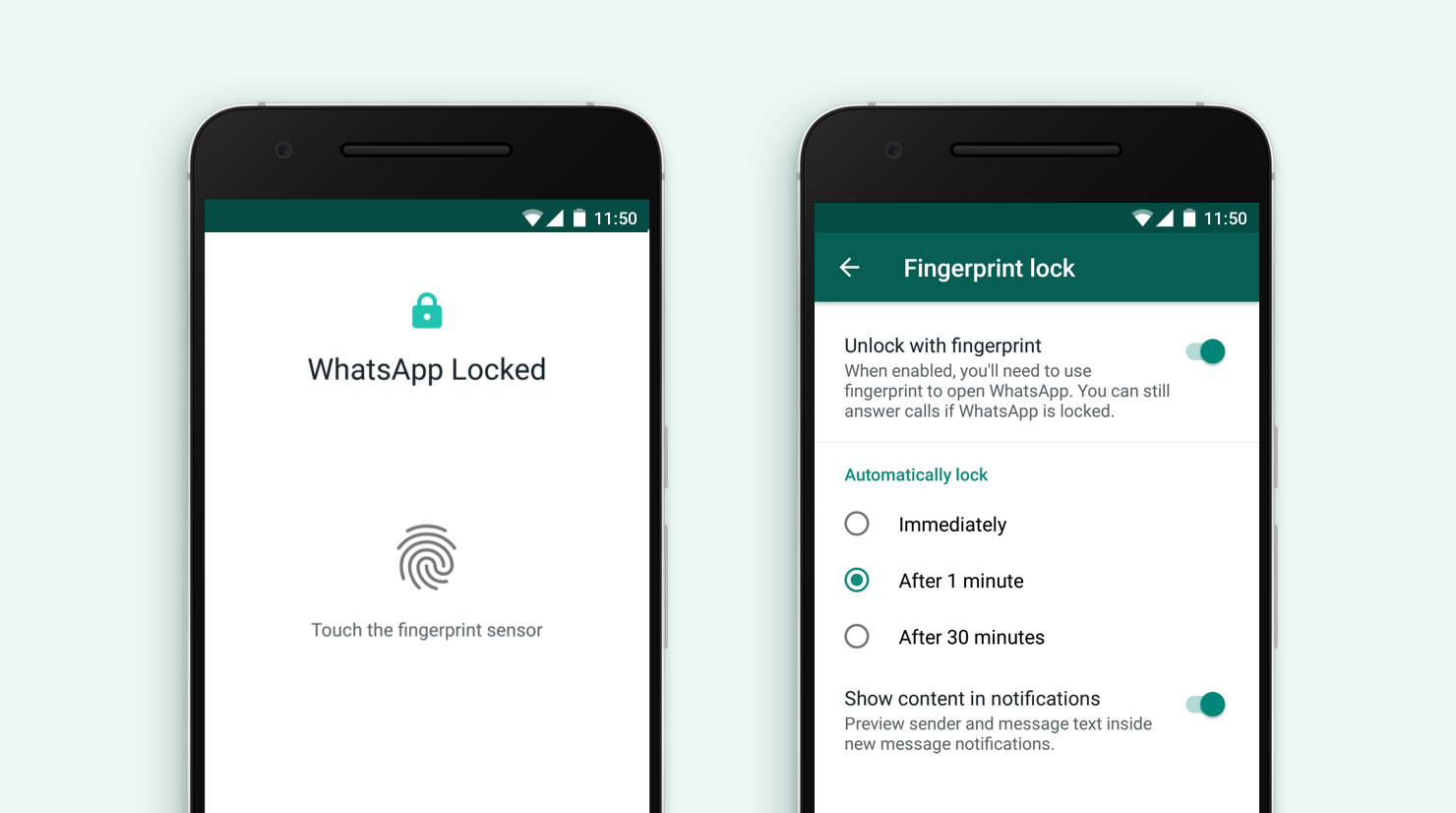
    WhatsApp Fingerprint unlocking
    WhatsApp Fingerprint unlocking
    Share
    Facebook Twitter LinkedIn WhatsApp Telegram

    Months after launching fingerprint unlock support on iOS, WhatsApp has finally delivered the same for the Android community. For iOS, the company supported both Touch ID and Face ID for security, but for Android, there is only fingerprint support for now – no face unlock, just yet.

    As of the latest update, you will now be able to lock down your WhatsApp chats using your phone’ fingerprint unlock feature.

    With the latest update, you don’t have to worry about nosy friends on your WhatsApp chats. As you’d expect, the fingerprint lock support will only work for phones with biometric unlock available.

    When turned on, all the new chats will not be publicly displayed on the quick notification panel.

    For WhatsApp calls, this feature does not lock that down, just yet. But since calls bypass screen lock features on Android, it makes sense that the company chose not to lock down WhatsApp calls just like regular calls.

    How to Enable Fingerprint Unlock in WhatsApp

    • Navigate to WhatsApp Settings page
    • Click on Account then Privacy
    • On the privacy page, there will be a new fingerprint lock option
    • Tap on fingerprint lock and enable it by toggling the “unlock with fingerprint” button.

    On this page, you can also choose to lock your WhatsApp chats automatically, either immediately, after 1 minute or after 30 minutes.

    The last option available on this page is the “Show content in notifications” option. Turning this option will allow your chat messages to be previewed from the quick access panel. So for better privacy, turn it off.

    whatsapp WhatsApp for Android
    Alvin Wanjala
    • Facebook
    • X (Twitter)
    • Instagram

    Alvin Wanjala has been writing about technology for over 2 years(and counting). He writes about different topics in the consumer tech space. He loves streaming music, programming, and gaming during downtimes.

    Related Posts

    Airtel Money Partners With I&M Bank To Expand Digital Payments Reach Across Kenya

    December 11, 2025

    Fincra Named Headline Supporter for Africa Tech Summit Nairobi 2026

    December 11, 2025

    NTT DATA’s 2026 Global AI Report shows how top performers turn AI vision into value

    December 11, 2025

    Comments are closed.

    Latest Posts

    Visa Showcases 22 Startups at Africa Fintech Accelerator Demo Day in Cape Town

    December 11, 2025

    Airtel Money Partners With I&M Bank To Expand Digital Payments Reach Across Kenya

    December 11, 2025

    Fincra Named Headline Supporter for Africa Tech Summit Nairobi 2026

    December 11, 2025

    What You Need to Know About KCB and Visa’s New Tap to Phone Payment Solution in Kenya

    December 11, 2025
    Advertisement
    Editor's Pick

    What You Need to Know About KCB and Visa’s New Tap to Phone Payment Solution in Kenya

    December 11, 2025

    Accelerated entry: How East Africa Leapfrogged into the Cloud Age

    December 11, 2025

    How Buying Data on M-PESA Opened New Doors for Sheila

    December 10, 2025

    Why endpoint security still anchors cyber resilience in Africa

    December 9, 2025
    © 2025 TechArena.. All rights reserved.
    • Home
    • Startups
    • Reviews

    Type above and press Enter to search. Press Esc to cancel.