


Close Menu

    Subscribe to Updates

    Get the latest tech news

    Facebook X (Twitter) Instagram
    TechArenaTechArena
    • Home
    • News
    • Reviews
    • Features
      • Top 5
    • Startups
    • Contact
    Facebook X (Twitter) Instagram
    TechArenaTechArena
    Home»Features»You Can Now Send Google Chrome Tabs to Your Other Devices, Here’s How
    Features

    You Can Now Send Google Chrome Tabs to Your Other Devices, Here’s How

    Kaluka wanjalaBy Kaluka wanjalaSeptember 13, 20192 Mins Read
    Facebook Twitter Telegram LinkedIn WhatsApp Email Pinterest
    Google Chrome for Android
    Google Chrome for Android
    Share
    Facebook Twitter LinkedIn WhatsApp Telegram

    Google Chrome Version 77 is out and has improved on a number of things on the browser but the key one is letting you share tabs between devices. This feature is available n the stable version of Chrome right now but has been available for some users on the desktop version for the past few weeks.

    With Chrome 77, the ability to share links between devices is now an option every user will have. The feature is available on Chrome for Android, Windows, Linux, Mac and iOS. I have it on both my Chrome on desktop and on my phone. If you don’t have the option on your end, don’t worry, the update just started rolling out and may take time to get to you.

    Besides the ability to share tabs with your other devices, Google says this update brings with it stability and performance improvements and a total of 52 security fixes. Sounds a lot but these are necessary for the safety of those using the browser.

    How to Send Google Chrome Pages to Your Other Devices

    If you want to send Chrome pages to your other devices, the process is now easier and all you have to do is:

    • Tap on the Menu (three dots on the top right section) of the Chrome page that you want to share.
    • Tap on the share option.
    • You will get a number of options but select “Send to your devices” if it is available for you.
    • A list of your device will be displayed and choose the one you want to sent the page to.

    Note: You should have signed in to Chrome to use this feature.
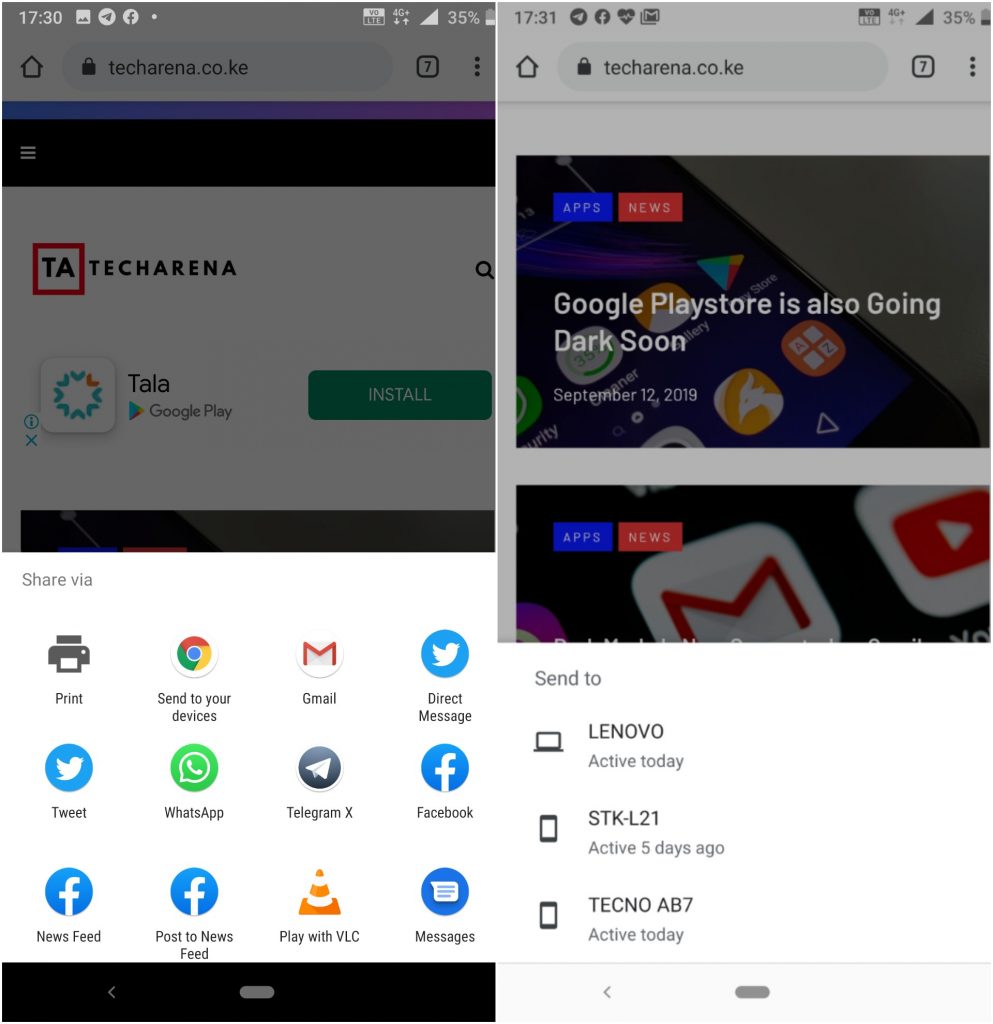
    Share chrome pages

    Also Read: Google Chrome Will Soon Start Blocking Third-Party Tracking Cookies

    chrome chrome for android
    Kaluka wanjala
    • Website
    • Facebook
    • X (Twitter)
    • LinkedIn

    Editor at TechArena. I cover all things technology and review new gadgets as I get them. You can reach me on email: [email protected]

    Related Posts

    Inside Ampersand the Startup Powering East Africa’s Electric Motorcycles

    December 11, 2025

    What You Need to Know About KCB and Visa’s New Tap to Phone Payment Solution in Kenya

    December 11, 2025

    Accelerated entry: How East Africa Leapfrogged into the Cloud Age

    December 11, 2025

    Comments are closed.

    Latest Posts

    Huawei DigiTruck Programme Launched in Dagoretti North

    December 15, 2025

    Expanding Canon EMEA’s Coral Conservation Initiative into East Africa

    December 15, 2025

    Tsedey Bank Selects Nutanix Cloud Platform to Modernise Banking Infrastructure

    December 15, 2025

    HealthX Introduces KES 15-a-Day Digital Health Cover for Boda Boda Riders

    December 15, 2025
    Advertisement
    Editor's Pick

    Inside Ampersand the Startup Powering East Africa’s Electric Motorcycles

    December 11, 2025

    What You Need to Know About KCB and Visa’s New Tap to Phone Payment Solution in Kenya

    December 11, 2025

    Accelerated entry: How East Africa Leapfrogged into the Cloud Age

    December 11, 2025

    How Buying Data on M-PESA Opened New Doors for Sheila

    December 10, 2025
    © 2025 TechArena.. All rights reserved.
    • Home
    • Startups
    • Reviews

    Type above and press Enter to search. Press Esc to cancel.