Close Menu

    Subscribe to Updates

    Get the latest tech news

    Facebook X (Twitter) Instagram
    TechArenaTechArena
    • Home
    • News
    • Reviews
    • Features
      • Top 5
    • Startups
    • Contact
    Facebook X (Twitter) Instagram
    TechArenaTechArena
    Home»News»How to schedule a live videos On Facebook
    News

    How to schedule a live videos On Facebook

    Kaluka wanjalaBy Kaluka wanjalaOctober 19, 2016Updated:August 15, 20252 Mins Read
    Facebook Twitter Telegram LinkedIn WhatsApp Email Pinterest
    Share
    Facebook Twitter LinkedIn WhatsApp Telegram

    Yesterday, Facebook rolled out a new feature that allows users to schedule their live events up to one week in advance. This feature is currently available for verified accounts and pages but Facebook has confirmed that it will be rolling it out to other users very soon.

    Since this is a new feature, not many people may know how to use it right now. If you want to be able to schedule live Facebook broadcasts but don’t know how, then this post is for you. Follow the steps list below and to get started.

    Note: This feature works for those using the Facebook Live API and the instructions are meant for page admins, we will have a different post for individual users when the feature rolls out to the public.

    • Open Publishing Tools

    facebook publishing

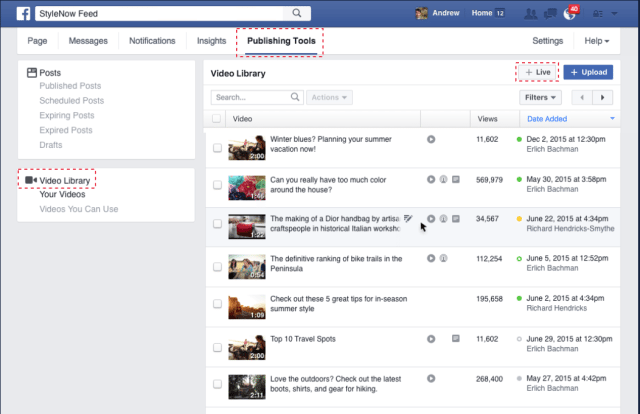
    The first thing you should do is head over to the page that you admin and click on the ‘Publishing Tools’ tab. When the page opens, tap on the ‘Live’ button.

    • Note Down the Credentials

    facebook live credentials

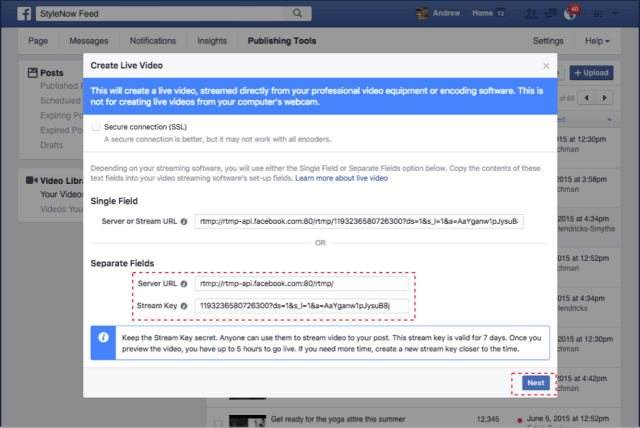
    Copy down the credentials that include your server Url and stream key. You will be able to access these same credentials by editing that specific post in the video library.

    • Write the Video Description

    facebook live

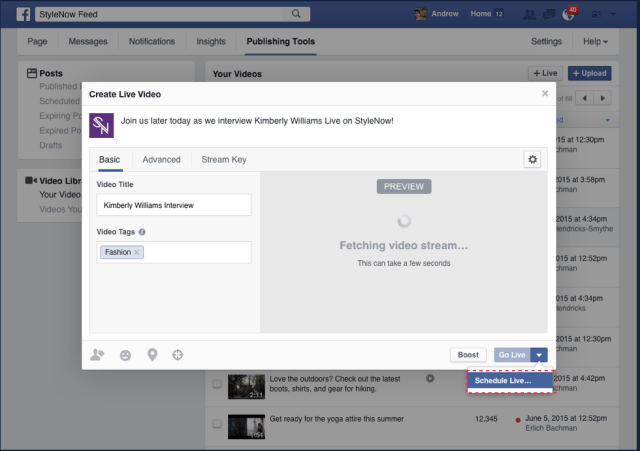
    If you are good to go, go ahead and write the video description. You will be able to edit the description later so don’t worry if you can’t come up with something more creative or engaging the first time.

    • Finalize

    When happy with the progress, add the final touches including the custom image and then schedule the live broadcast.

    source

    facebook Facebook live
    Kaluka wanjala
    • Website
    • Facebook
    • X (Twitter)
    • LinkedIn

    Editor at TechArena. I cover all things technology and review new gadgets as I get them. You can reach me on email: [email protected]

    Related Posts

    Safaricom’s Shangwe @25 Celebrations Spotlight Drivers and Riders as Key to Kenya’s Mobility Ecosystem

    December 17, 2025

    Safaricom Lists Kenya’s Largest Green Bond as Retail Investors Take 96% of Applications

    December 17, 2025

    BasiGo opens new electric bus charging hub at Shell Athi River

    December 17, 2025

    Comments are closed.

    Latest Posts

    Safaricom’s Shangwe @25 Celebrations Spotlight Drivers and Riders as Key to Kenya’s Mobility Ecosystem

    December 17, 2025

    [Op-Ed] How Safaricom Is Helping Enterprises Build Cyber Resilience

    December 17, 2025

    Safaricom Lists Kenya’s Largest Green Bond as Retail Investors Take 96% of Applications

    December 17, 2025

    BasiGo opens new electric bus charging hub at Shell Athi River

    December 17, 2025
    Advertisement
    Editor's Pick

    [Op-Ed] How Safaricom Is Helping Enterprises Build Cyber Resilience

    December 17, 2025

    [Op-Ed] From Generative to Agentic: How Kenya’s AI Future Will Be Built on Trust, Data and Practical Automation

    December 16, 2025

    Inside Ampersand the Startup Powering East Africa’s Electric Motorcycles

    December 11, 2025

    What You Need to Know About KCB and Visa’s New Tap to Phone Payment Solution in Kenya

    December 11, 2025
    © 2025 TechArena.. All rights reserved.
    • Home
    • Startups
    • Reviews

    Type above and press Enter to search. Press Esc to cancel.