


Close Menu

    Subscribe to Updates

    Get the latest tech news

    Facebook X (Twitter) Instagram
    TechArenaTechArena
    • Home
    • News
    • Reviews
    • Features
      • Top 5
    • Startups
    • Contact
    Facebook X (Twitter) Instagram
    TechArenaTechArena
    Home»News»Google Is Waging War On Websites Fake Download Buttons
    News

    Google Is Waging War On Websites Fake Download Buttons

    Kaluka wanjalaBy Kaluka wanjalaFebruary 5, 20162 Mins Read
    Facebook Twitter Telegram LinkedIn WhatsApp Email Pinterest
    Google war on deceptive ads
    Google war on deceptive ads
    Share
    Facebook Twitter LinkedIn WhatsApp Telegram

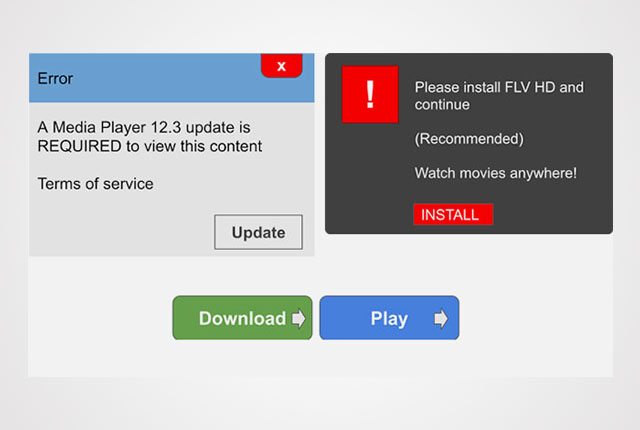
    If you spend most of your time on the internet, you may have come across websites with fake “download” and “play” buttons. These can be very annoying to the user who may feel like his/her time was wasted by the whole process. Most of these websites use the fake buttons to deceive users to click on advertisements.

    Google has announced that it will be cracking down on websites that have fake “download” and “play” buttons that are used to deceive users. In a blog post, the company said, “In November, we announced that Safe Browsing would protect you from social engineering attacks – deceptive tactics that try to trick you into doing something dangerous, like installing unwanted software or revealing your personal information (for example, passwords, phone numbers, or credit cards).”

    The company went ahead to say, “You may have encountered social engineering in a deceptive download button, or an image ad that falsely claims your system is out of date. Today, we’re expanding Safe Browsing protection to protect you from such deceptive embedded content, like social engineering ads.”

    This is a very positive move by Google as some of these websites have been very annoying and intrusive to say the least.

    According to Google, a web page will be considered social engineering when it:

    • Pretend to act, or look and feel, like a trusted entity — like your own device or browser, or the website itself.
    • Try to trick you into doing something you’d only do for a trusted entity — like sharing a password or calling tech support.

    Read More: No Need for A Google+ Account to Sign in to Google Play

    Google
    Kaluka wanjala
    • Website
    • Facebook
    • X (Twitter)
    • LinkedIn

    Editor at TechArena. I cover all things technology and review new gadgets as I get them. You can reach me on email: [email protected]

    Related Posts

    Safaricom’s Shangwe @25 Celebrations Spotlight Drivers and Riders as Key to Kenya’s Mobility Ecosystem

    December 17, 2025

    Safaricom Lists Kenya’s Largest Green Bond as Retail Investors Take 96% of Applications

    December 17, 2025

    BasiGo opens new electric bus charging hub at Shell Athi River

    December 17, 2025

    Comments are closed.

    Latest Posts

    Vertiv and GreenScale Partner to Deliver AI-Ready Hyperscale Data Centres in Europe

    December 17, 2025

    Safaricom’s Shangwe @25 Celebrations Spotlight Drivers and Riders as Key to Kenya’s Mobility Ecosystem

    December 17, 2025

    [Op-Ed] How Safaricom Is Helping Enterprises Build Cyber Resilience

    December 17, 2025

    Safaricom Lists Kenya’s Largest Green Bond as Retail Investors Take 96% of Applications

    December 17, 2025
    Advertisement
    Editor's Pick

    [Op-Ed] How Safaricom Is Helping Enterprises Build Cyber Resilience

    December 17, 2025

    [Op-Ed] From Generative to Agentic: How Kenya’s AI Future Will Be Built on Trust, Data and Practical Automation

    December 16, 2025

    Inside Ampersand the Startup Powering East Africa’s Electric Motorcycles

    December 11, 2025

    What You Need to Know About KCB and Visa’s New Tap to Phone Payment Solution in Kenya

    December 11, 2025
    © 2025 TechArena.. All rights reserved.
    • Home
    • Startups
    • Reviews

    Type above and press Enter to search. Press Esc to cancel.